
lfcorullon13651490
Legend
October 27, 2018
Question

Keep transparency color appearance when rasterizing

  • October 27, 2018
  • 4 replies
  • 5991 views

Hello, all.

I need to raster backgrounds and some of my files have pageItems that uses transparencies.

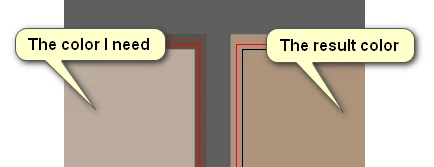
I need to keep the color appearance that element has, but rasterizing it. Am I clear?

Of course the items behind that transparent element must have their colors kept too.
This topic has been closed for replies.

4 replies

Ray Yorkshire
Participating Frequently
October 31, 2018

Interesting problem anyway, which I don't understand but I would like to.

If you change the  Document Color Mode , to RGB

then the reduced transparency colors  behave the same against both the artboard white, and a rectangle of white; as they should.

What does that say?

that there's RGB colours gatecrashing a CMYK document?

So maybe

File > Document Color Mode >  RGB

Object rasterize (background white)

File > Document Color Mode > CMYK

or is there a flaw in this...

lfcorullon13651490
Legend
October 31, 2018

Great! Great suggestion!

One of the colors is kept. The most back object, however, doesn't.

As you can see here:

The original file is still on my dropbox if you want to see it: Dropbox - tests_examples_LFC.ai

Thanks for trying help me.

Ton Frederiks
Community Expert
Community Expert
October 28, 2018

CC 2019 what are your document color settings?

If they are Emulate Adobe  Illustrator 6.0, you need to change it to something that is color managed.

lfcorullon13651490
Legend
October 28, 2018

Are you meaning cmyk/rgb?

I'm using cmyk.

Ton Frederiks
Community Expert
Community Expert
October 28, 2018

No, I mean Edit > Color Settings, what are those settings?

Anna Lander
Inspiring
October 28, 2018

When rasterizing, choose Transparent for Background option

lfcorullon13651490
Legend
October 28, 2018

Yes. But I need the bg to be flatten, as a jpg. No transparencies. But

keeping the colors...

Monika Gause
Community Expert
Community Expert
October 27, 2018

I really don't understand what you're doing there.

Please describe step by step:

what exactly are you rasterizing? How is it built?

which document color mode?

are there placed images included?

which version and system?

how is color management set up?

how exactly are you rasterizing it?

lfcorullon13651490
Legend
October 27, 2018

I'm rasterizing vector (path) elements.

Every of them are filled with color.

Some of them could have transparency changed.

Some of them could be behind the ones that has transparencies, so it's

color is visually changed too.

Im using cmyk color mode.

No, there is not images placed.

I'm using Win10 and AI CC2019.

I need to rasterize those elements by javascript. But I'm making manual

tests first. To do it, I just select the items I want to raster and object

rasterize.

Am I doing something wrong?

>