Participant
March 25, 2017
Question

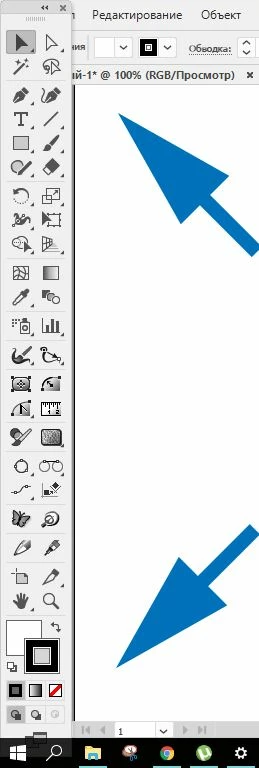
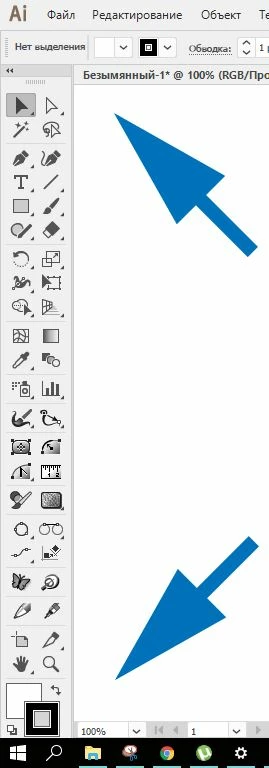
Large size Illustrator 2017

  • March 25, 2017
  • 2 replies
  • 309 views

Large size of the program interface Illustrator 2017

Help me, please!!!
    This topic has been closed for replies.

    2 replies

    mist30Author
    Participant
    March 28, 2017

    Ton Frederiks
    Community Expert
    Community Expert
    March 26, 2017

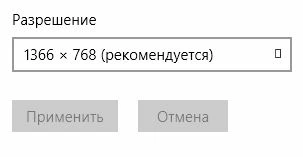
    Try another (higher) monitor resolution. You have a lot of extra tools.

    You can also try to create your own Tools panel(s).

    Monika Gause
    Community Expert
    Community Expert
    March 29, 2017

    That's not "a lot of extra tools".

    The problem with the custom toolsbars is that they don't contain the drawing modes buttons.

    @mist30:

    If the system doesn't support higher resolutions there's not much to do about the issue other than relying on shortcuts.

    To change the drawing mode (behind or inside object): Shift + D (the shortcut circles through the modes)

    To apply Fill, Gradient and "None": , . # (comma, point, hash)

    To change the display mode: F

    Please report this aas a feature request.

    Feature Request/Bug Report Form