

Om Nath Jha
Legend
June 26, 2020
Question

Larger Canvas in Illustrator 24.2 – 100x more space!

  • June 26, 2020
  • 16 replies
  • 21128 views

The latest release of Illustrator (24.2) comes with one of the most requested features, a larger canvas with 100x more space to keep all your assets organized in one project.


Now whether you need room to design or create wall art, billboards, advertisements, and more, you can expand your canvas area without worrying about the artwork dimensions, precision, and scale.
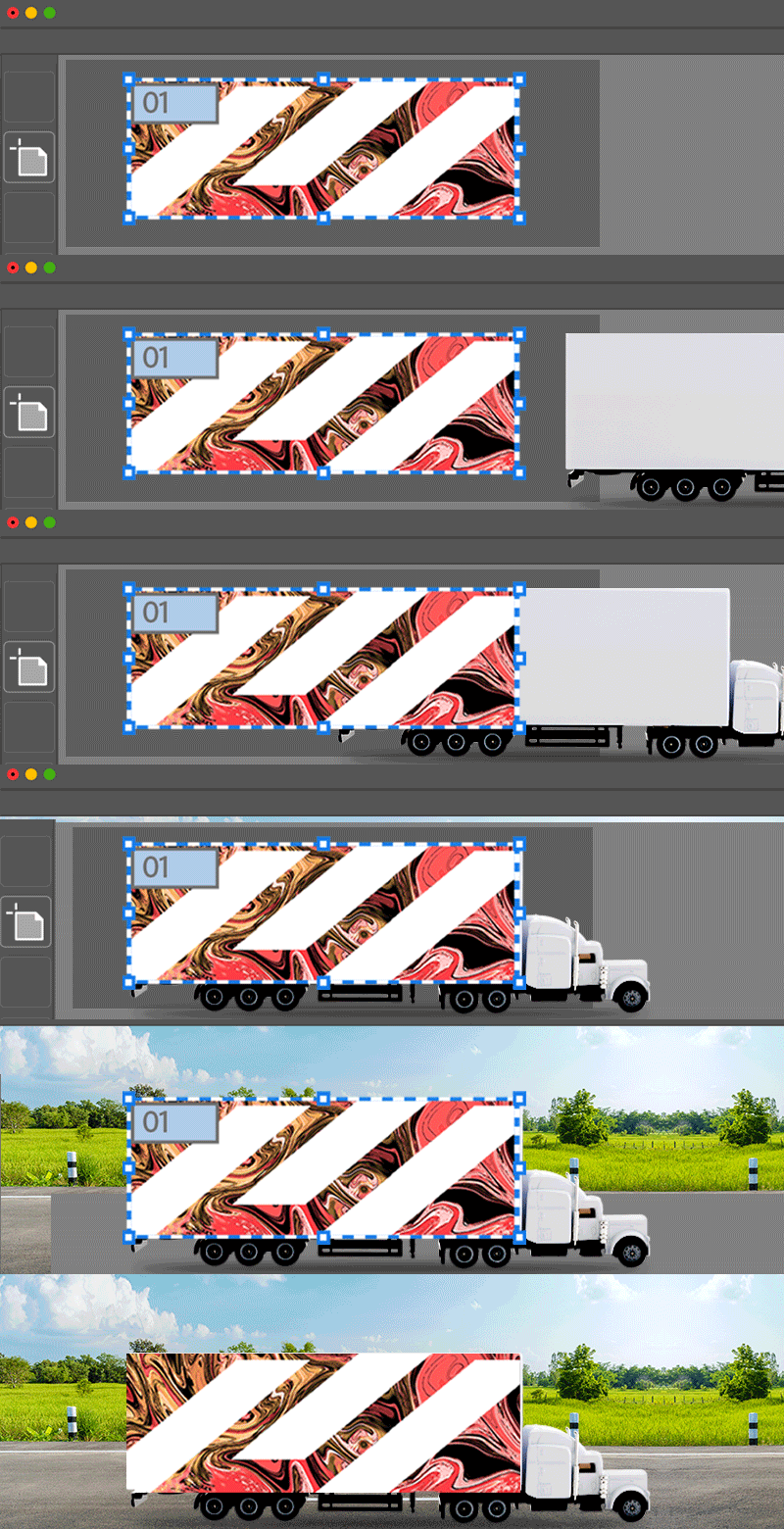


Illustrator 24.2 offers a canvas size of 2270 x 2270 inches which lets you create multiple artboards with larger dimensions. You can also use these updated units in the Units drop-down: Feet, Meters, Yards, and Feet & Inches.

To ensure that the new document is created with a larger canvas use the following settings in the New Document dialog:

  • Specify the artboard size of more than 227 inches (default canvas size). You can also choose the specified units in Feet, Meters, Yards, or Feet & Inches.
  • Large canvas allows you to accommodate more artboards than the default canvas size.
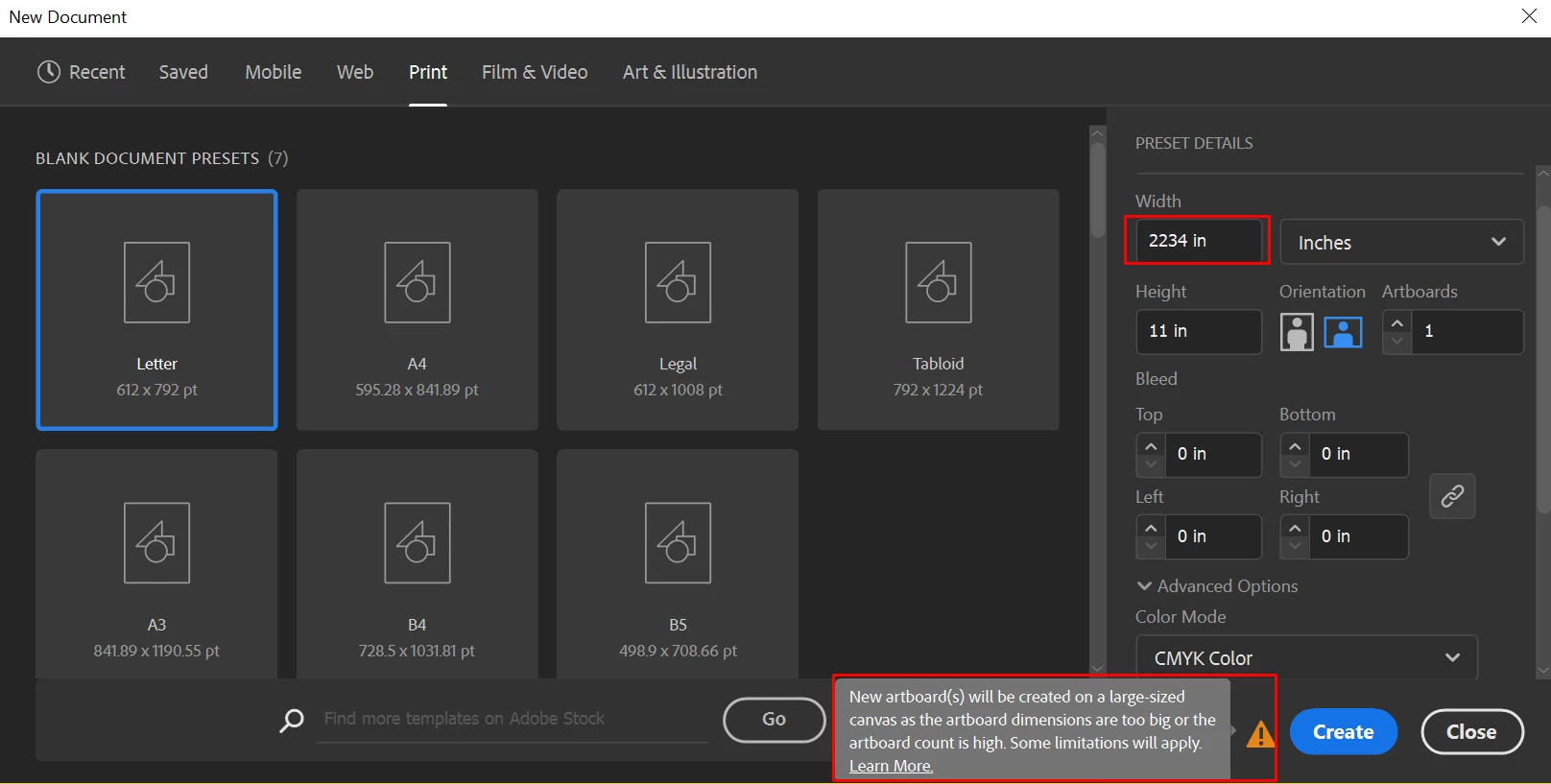
 

An alert sign is displayed at the bottom of the New document dialog indicating that the specified dimensions are bigger than the default canvas size and the new document will be created on a large canvas. 


Check this link for more details about this feature.


Large canvas FAQs:

Can I copy artwork from a large canvas to the default canvas?

  • Yes, you can copy-and-paste artwork from large-sized canvas to the default canvas. However, if the large-scale artwork does not fit in the canvas or hits canvas bounds, the artwork is automatically scaled down to fit into the canvas size. 

Can I save large-scaled artwork as a PDF?

  • Yes, you can save your artwork as a PDF.  To view your artwork in actual size, use Acrobat 1.6 or later.
  • When you save the large-scaled artwork with the PDF version 1.5 or below, the artwork is scaled-down and appears ten times smaller on opening the PDF.

What happens when I Open the large-scaled artwork in a previous version of Illustrator?

  • When you save or export the artwork created on a large-sized canvas in Illustrator version below 24.0, the artwork will appear ten times smaller so that it gets accommodated in the default canvas size. Note that it may also disable some editing features and change the text layout.


What are the Supported formats for export and limitations?


  • Currently, the following formats are supported if you export a large-sized document: PDFPNGJPEGPSDTIFF, and SVG.
  • The Slices and Save for web features do not currently work with large-size canvas. If you are using Actions that involve these features, steps related to them will be skipped.


Check this link for more FAQs and known issues.

This topic has been closed for replies.

16 replies

LuckyMuc
Participating Frequently
July 3, 2020

Great!!  I wrote so many times since years to Adobe to add this in Illustrator!!! I drawed the first 18 meter advertisings and it works great! Thank you very much!!!

But I found a small bug in a for me very important feauture: The align tool dont work. In the last update 2 days ago is this bug not fixed.

This is only a example.. in the following case I use normaly the transform funktion. But in many cases its faster with the align tools and the even distribution.   


Please fix it soon 🙂

Om Nath Jha
Legend
July 8, 2020

Hi there,


This issue has been fixed in the latest update (24.2.1). Please check this link for more details.


Please note that after upgrading you might still see that 'Align To' sets itself to 'Align to Key Object'. If you see this, please manually set it to the required setting. The reason it might get set to 'Key Object' after the update is that Ai remembers your last 'Align To' setting on subsequent launches as well. 


Regards,

Om

Participating Frequently
July 3, 2020

How do we go about opening files created in the Beta Large Canvas 2.1 Build in the new "official" release of large canvas?  All my files scale down as if I was opening in an older version of AI.

Monika Gause
Community Expert
Community Expert
July 4, 2020

Please ask questions about beta versions in the prerelease forum.

Participating Frequently
July 6, 2020

This question is not about the Beta release, its about why the current release version will not open large canvas files from the beta.

Disposition_Dev
Legend
July 2, 2020

i mean, cool... but the real question is "why is this a limitation that exists at all?!"


illustrator handles vector artwork. there should be absolutely no reason to have a hard limit in any direction. it's just math. the math that defines a shape doesn't stop working if the dimensions become larger than 2700 inches.


This is a completely arbitrary limitation that has plagued customers since the beginning... and somehow it seems that the issue isn't clear and you've spent time and energy rebuilding something instead of destroying it all together.

Dave Creamer of IDEAS
Community Expert
Community Expert
July 27, 2020

I completely agree that AI shouldn't have a size limit. All this feature is really doing is the 10x math in the background. You will notice that the size "increased" 10x (squared), but the zoom is reduced 10x. Not much different than the old method of doing the 10x math on ones own and scaling the printing upon output.


I see this feature in the same category as artboards, which I view as simply a "clipping path" page view of the original 227 squared size.


Don't get me wrong, I like both features, but I don't view them as radical new features--just clever workarounds.

David Creamer: Community Expert (ACI and ACE 1995-2023)
Known Participant
July 2, 2020

Big surprise, it doesn't work. I have this new version and when I tride to enlarge a graphic to 400" I got the usual answer that it didn't fit on the artboard. I don't know what Adobe is trying to say, but if you can't enlarge something larger than 227" then there has been no change in the artboard maximum size. If this is actually more like a CAD Tools workaround, then say so. That would be welcome. In fact, create a CAD Tools menu for it as well. Then you will have something to talk about. It won't be a "100x larger" artboard, but it will eventually be a helpful change to the current workflow of creating artwork at a fractional size of the production output.

MHBrown

Om Nath Jha
Legend
July 2, 2020

Hi Mike,


Would you mind sharing a little bit more about your workflow so that we can assist you further? What's the dimension of the artboard? I am able to create artwork that is larger than 227" without any error. 


Thanks,

Om

Participating Frequently
July 3, 2020

If you already have a document open, that is not created as a Large Canvas, you are not able to scale it beyond the 227" which is as he says much better than I will "is defeating the purpose"

Christian Bernal V
Participant
June 30, 2020

Solo para aclarar, el tamaño máximo es: 227" o,  2270"

... llustrator 24.2 ofrece un tamaño de lienzo de 2270 x 2270 pulgadas que le perm....


Exuberant_outfit5DC7
Participant
June 28, 2020

Something really incredible, being able to organize everything in a single work table.

Great