


Inspiring
January 26, 2026
Answered

Layer bug

  • January 26, 2026
  • 2 replies
  • 77 views

Hello,


I'm encountering a new bug of sorts, surrounding the Layers pannel.


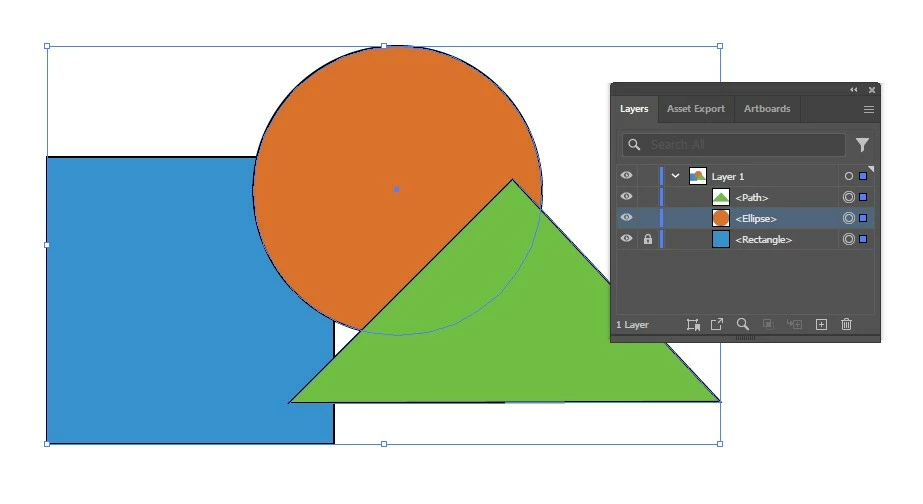
Basically, if I lock the blue square and click on the "Layer 1," all three paths are still actively selected and free for manipulation. I have to manually unselect it to keep it locked from any revision.


I've been using .ai for close to two decades without this problem until recently. Any suggestions?


MatthewScreenshot_1.jpg
Correct answer Trains1985

If I understand your question correctly, YES. From my experience, however, whenever I clicked the layer (I'll call it the root layer) while one, or more paths were locked, I just didn't have to be concerned about their status.


I'm sorry it's so hard for me to explain. I just haven't this issue before.  Are there any cases where the lock symbol should be overrided?


Matthew

2 replies

Kurt Gold
Community Expert
Community Expert
January 26, 2026

This behaviour is not new. It has been there for a long time.


It is an intended behaviour and it has been discussed many times.


Some users (like me) do basically accept and appreciate it since there is a specific logic when selecting entire containers (layers) that may contain locked objects as junior objects in the Layers panel. Some other users do not understand that logic and rather want to have a preference to prevent these objects from being selected.


My main complaint is that the current selection routines are not consistent when dealing with nested layer/group structures.


You may want to do a forum search to find some passionate debates about this topic.

CarlosCanto
Community Expert
Community Expert
January 26, 2026

are you clicking on the space to the right of the Target circle?


click on the Target circle instead

Trains1985AuthorCorrect answer
Inspiring
January 26, 2026

If I understand your question correctly, YES. From my experience, however, whenever I clicked the layer (I'll call it the root layer) while one, or more paths were locked, I just didn't have to be concerned about their status.


I'm sorry it's so hard for me to explain. I just haven't this issue before.  Are there any cases where the lock symbol should be overrided?


Matthew

CarlosCanto
Community Expert
Community Expert
January 26, 2026

to be honest, I don't remember if selecting the root layer selects everything including the locked items. I don't use it like that. I just tried now to try to answer the question. It may be a new "feature" requested by users, who knows.


I would just get use to clicking the target button going forward


CarlosCanto_0-1769459925108.png