
Participant
February 25, 2021
Answered

Layering changes appearance of colors

  • February 25, 2021
  • 2 replies
  • 656 views

I am having difficulties with the appearance of colors on my map. It seems that the layers are distorting each other. There are two issues:

  1. Having a layer 'inside' another layers masks the color of the layer inside. (See picture, on left, the pink object within the blue object should be the same pink as the one to the left of it, but looks masked.)
  2. Colors of objects on my map appear different than the ones in my legend, even though they are the same and have the same opacity (ex. Transvaal Supergroup color should be the same as the khaki brown on map, but it is different.)

Thank you for your help. I am still trying to figure out Illustrator. 


Using 24.0.2
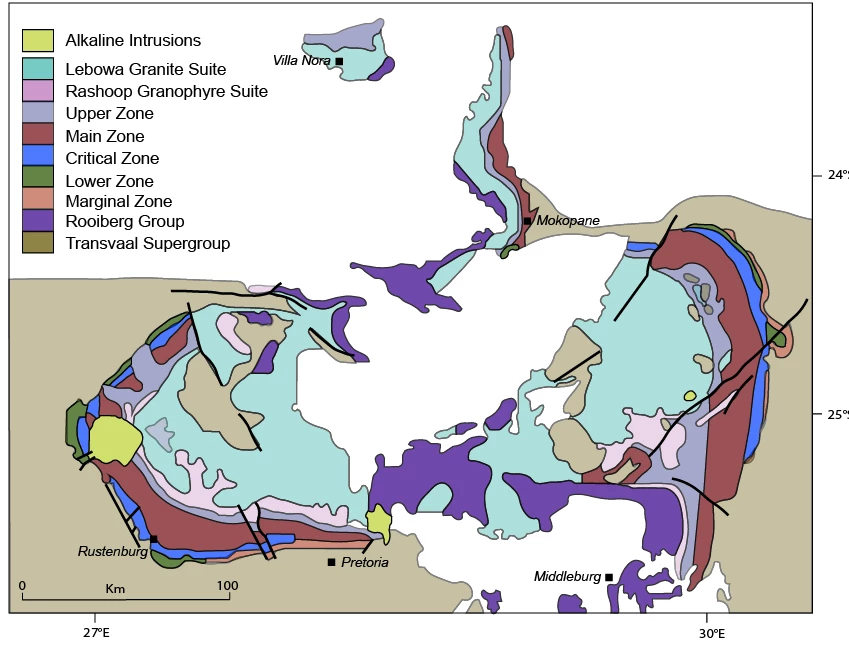


[ attachment inserted as inline image by moderator ]

This topic has been closed for replies.
Correct answer Emily Fischer

This was close to the solution... I added the swatches which I hadn't done before. Then realized that my layer color was somehow different from the color of the paths in the layers. That was affecting the saturation. Thank you!

2 replies

kphotopage
Legend
February 26, 2021

Emily, Hi.


This is a shot in the dark.

You are working with Global swatches.

In your Legend, you have 100% color.

In your Map, you have tints of that same color.


K

Emily FischerAuthorCorrect answer
Participant
February 26, 2021

This was close to the solution... I added the swatches which I hadn't done before. Then realized that my layer color was somehow different from the color of the paths in the layers. That was affecting the saturation. Thank you!

kphotopage
Legend
February 26, 2021

You’re welcome Emily. Thank your feedback.


I also figured there could be more factors affecting the color difference but without having your Illustrator file, I thought I would start with Global swatches and %.


Layers Panel plus Appearance Panel is always a good place to start looking!!!


Glad you resolved your problem. 😀


K

Monika Gause
Community Expert
Community Expert
February 25, 2021

We need to see the way they are stacked and nested in the layers apnel. Alsoit's interesting to see the appearances.