
neegedee
Participating Frequently
May 31, 2020
Answered

Layers and CC libraries windows disappear when anything selected on screen

  • May 31, 2020
  • 1 reply
  • 1852 views

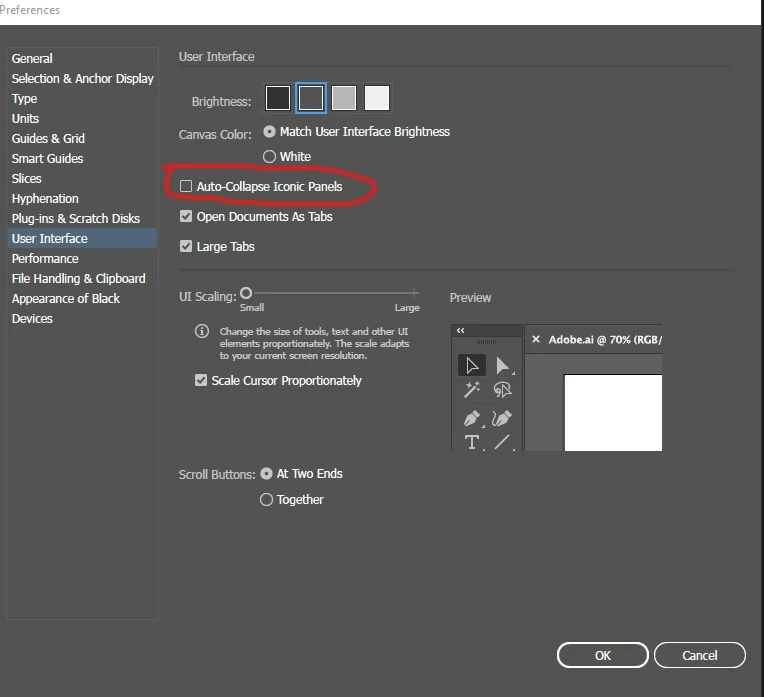
I have been having an issue in Illustrator that when I select something on an artboard, or anywhere on screen - an image, text, whatever - the layers window disappears. Similarly, when I want to place an image in a CC Library, once I select the image to drag across the window disappears. I am still able to dump the image into the library, but I have to hover the image above the closed icon until it reopens.


As long as everything is still working then it is alright, but this is extremely frustrating and time consuming overall.


Thanks
This topic has been closed for replies.
Correct answer Ares Hovhannesyan

Please check  if  "Auto-Show Hidden Panels is selected in Interface preferences." is off?


Hide or show all panels

  • To hide or show all panels, including the toolbar and Control panel, press Tab.

  • To hide or show all panels except the toolbar and Control panel, press Shift+Tab.

    Tip: You can temporarily display hidden panels if Auto-Show Hidden Panels is selected in Interface preferences. It’s always on in Illustrator. Move the pointer to the edge of the application window (Windows®) or to the edge of the monitor (Mac OS®) and hover over the strip that appears.

1 reply

Ares Hovhannesyan
Community Expert
Ares HovhannesyanCommunity ExpertCorrect answer
Community Expert
May 31, 2020

Please check  if  "Auto-Show Hidden Panels is selected in Interface preferences." is off?


Hide or show all panels

  • To hide or show all panels, including the toolbar and Control panel, press Tab.

  • To hide or show all panels except the toolbar and Control panel, press Shift+Tab.

    Tip: You can temporarily display hidden panels if Auto-Show Hidden Panels is selected in Interface preferences. It’s always on in Illustrator. Move the pointer to the edge of the application window (Windows®) or to the edge of the monitor (Mac OS®) and hover over the strip that appears.