
Participant
July 10, 2023
Question

Layers combining into single image

  • July 10, 2023
  • 2 replies
  • 161 views

Hello,

I am working on a file where I created clipping masks. Everything looks normal until I save down to CS2, then the clipping mask layers combine into a single image. Does anyone know why this is?


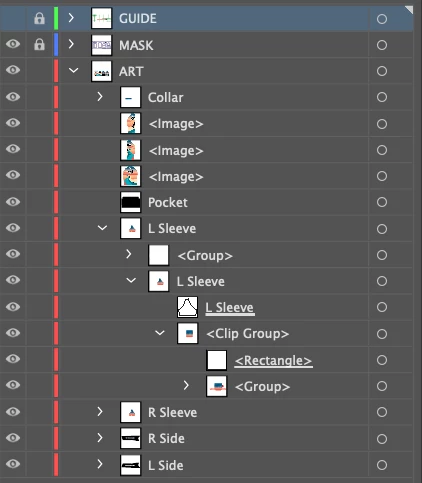
For Example The layers named <Image> are the ones that were affected. I expanded the L Sleeve layer to show what the layers are supposed to look like.
 

 Thank you!

This topic has been closed for replies.

2 replies

Monika Gause
Community Expert
Community Expert
July 10, 2023

Here's what happens to your objects when saving to legacy versions https://www.vektorgarten.de/illustrator-legacy-file-warning.html 

Community Expert
July 10, 2023

Are you incorporating features and effects into the artwork that is not compatible with down-saving to a version of Illustrator released 18 years ago? It sounds like a lot of the content in those layers is getting flattened/expanded as part of the down-saving process.

Participant
July 10, 2023

That could be the case. I'm the production artist, so I didn't create the art work unfortunately. My company creates designs for apparel printing and we have to save everything down to CS2 for our overseas department. I wish I knew more of the process because that might shed some light on the issue. However, I have been with this company for 6 months and this is the first time I've seen this issue. I'm not entirely sure if the CS2 is the cause of the issue, or if it is just a coincidence that this is when the merging happens.

Community Expert
July 10, 2023

Why is the overseas department using CS2 software? I can guess one likely reason, but that would sound judgmental. Still, having to do work and down-save to CS2 format will create a LOT of on-going headaches -especially if you have to handle any artwork from outside sources.


A great deal of new features and improvements have been incorporated into Adobe Illustator since CS2 was released in 2005. Most people using Illustrator don't consider the pitfalls of using all the new bells and whistles of the latest version. When they have to export art into other formats and/or save it down to earlier versions they can run into trouble. The trick is knowing what features and effects will "break" when down-saved. A lot of things will break when saving back as far as CS2.