Participant
July 7, 2017
Answered

Layers Disappearing at random

  • July 7, 2017
  • 1 reply
  • 622 views

So I am incredibly new to using illustrator (this is only day 2) so maybe this is a stupid question to ask but oh well.

Basically what I am trying to do is take a layer, and put a new layer on top. I then need to trace the bottom layer onto the new layer. I was able to do this yesterday perfectly fine, but today it won't work. Whenever I connect certain lines of the tracing it removes random lines inside the picture (its a building floor plan) so as I am connecting certain pieces it is removing the interior walls, or the cubicle walls at random.

I was able to get most of the outside walls made (I just didn't connect everything) but now as I am trying to do the interior walls things are disappearing as well (the door symbols, other walls, etc.) Which would not matter except it is incredibly difficult to trace when things keep disappearing. I can keep guessing, and a lot of times if I anchor to the piece that disappeared it will reappear slightly (at least the part between the 2 anchors will reappear) but any thoughts or suggestions would be appreciated.

Thanks!
    This topic has been closed for replies.
    Correct answer marian151678

    The words "No selection" mean that nothing is currently selected. As soon as you select something, those words will update to tell you what is selected.

    The drop down next to it in Mohammad's screen shot is for the fill, and a line does not have a fill.

    The drop down that Mohammad highlighted is for the stroke. A red slash means it is invisible. How did setting it to the red slash make it work (or am I misunderstanding you?)


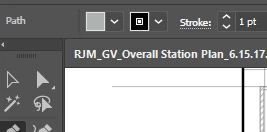
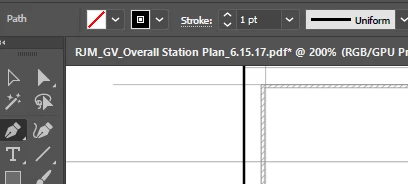
    The box that he highlighted (the stroke) I had set to black already. The box next to it (the fill as you stated) was set to gray. So when I changed the fill to not have any it stopped doing whatever it was doing. 

    I needed it to look like above, but for some reason it looked like the picture below

    So once I made the gray box into a red slash box (removing the fill apparently) it stopped trying to cover up the lines from the layer beneath.

    1 reply

    Mohammad.Harb
    Community Expert
    Community Expert
    July 7, 2017
    it is incredibly difficult to trace when things keep disappearing.

    it seems your stroke is set to none and you should pick a color for the stroke

    if this is not the case, Please share a screenshot

    Participant
    July 7, 2017

    That actually was not the problem. The drop down next to the 'No Selection' box was set wrong. I got it working again once I set it to the red slash. Thank you!

    jane-e
    Community Expert
    Community Expert
    July 7, 2017

    The words "No selection" mean that nothing is currently selected. As soon as you select something, those words will update to tell you what is selected.

    The drop down next to it in Mohammad's screen shot is for the fill, and a line does not have a fill.

    The drop down that Mohammad highlighted is for the stroke. A red slash means it is invisible. How did setting it to the red slash make it work (or am I misunderstanding you?)