



Answered
Layers Panel / Mixed views
Working with AI for 20+ years and these slight changes are what piss me off the most.
Within the layers panel, objects with no fill or stroke are showing up in the layer thumbnail in outline mode.
A quick glance to this thumbnail assures no stroke or fill are present in this cut layer, which is neccessary for output to printer. Now it shows object in outline mode which looks like a black stroked object.
Is there anyway to view all layer thumbs in preview mode like the past versions? Is this a bug?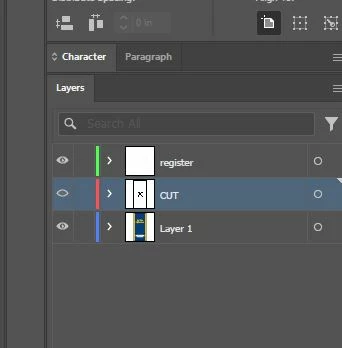
 AdChoices