pietera17573163
Participant
February 17, 2022
Question

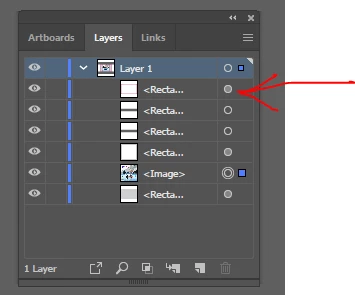
Layers window, meaning of the circle on the right?

  • February 17, 2022
  • 2 replies
  • 1138 views

In the layers window, sometimes the circle on the right is coloured in and sometimes not, what does this mean? And how do I change it so it is not coloured in as in the layer below. 
 

This topic has been closed for replies.

2 replies

Met1
Legend
February 24, 2022

I find it useful, and, as usual, Adobe have it covered:

https://helpx.adobe.com/illustrator/using/layers.html

Mylenium
Legend
February 17, 2022

That is supposed to indicate different content types and how they interact with underlying layers. Blending modes, compound paths, knockout groups and such. Not really useful and most people barely take note of that.


Mylenium

pietera17573163
Participant
February 24, 2022

Thank you @Mylenium Reason I am asking is because I do all my artwork in illustratior, and whenever that circle is coloured in my printing software does not recocnise my cutting contour anymore. At least I have an idea of what it means now.

Doug A Roberts
Community Expert
Community Expert
February 24, 2022

It means there are appearance attributes applied to the layer. I would disagree with Mylenium that it is "not really useful"; it's very useful and important to check.

Click on it, then open the Appearance panel to see what's affecting the layer.
