
tlmurray23
Inspiring
February 20, 2019
Answered

"Legacy text" dialog needs an update

  • February 20, 2019
  • 2 replies
  • 975 views

I accidentally opened about 300 old EPS files in a folder, and most generated that "legacy text" dialog. That dialog needs to change the "Cancel" to a "Skip Single", and Adobe needs add a "Cancel All" to stop the whole process and also "Skip All".

Then, to add insult to injury, I did a force quit and upon restarting Illustrator and opening just one file, I got a message about how Illustrator recovered hundreds . . . whereupon it  dutifully prompted me all over again for the whole set.

And of course, any app that has that legacy check needs the same update.
This topic has been closed for replies.
Correct answer barbara_a7746676

Oops. Thanks for the correction.

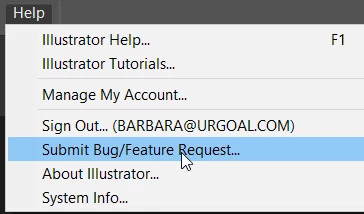
The easy way to go to the link is to launch Illustrator and choose Help menu.

2 replies

John Mensinger
Community Expert
Community Expert
February 20, 2019

I have doubts that what you're asking is even possible.

I accidentally opened about 300 old EPS files in a folder

That's not "open 300 files," it's open 1 file . . . 300 consecutive times. And, it's the OS file association feature issuing the command; not Illustrator.

Perhaps an [If you did one of a million possible things that no developer could anticipate, click here to force-restart the computer] button?

tlmurray23
Inspiring
February 21, 2019

Sorry, you're entirely wrong. The did a Select All on about 300 EPS files that are associated with Illustrator. As a Mac & Illustrator user since The Land That Time Forgot, I know what is issuing the message. Also, it's fairly easy to anticipate, as any operation that has no way of stopping unless processing hundreds of objects all the way through clearly needs a "stop".

barbara_a7746676
Community Expert
Community Expert
February 20, 2019
Doug A Roberts
Community Expert
Community Expert
February 20, 2019

That's the XD uservoice, Barbara. Here's the Illustrator one:

Adobe Illustrator Feedback

barbara_a7746676
Community Expert
barbara_a7746676Community ExpertCorrect answer
Community Expert
February 20, 2019

Oops. Thanks for the correction.

The easy way to go to the link is to launch Illustrator and choose Help menu.