Inspiring
January 22, 2025
Answered

Les tracés sont affichés en permanence

  • January 22, 2025
  • 2 replies
  • 759 views

Je pense avoir activé quelque chose par erreur qui affiche les tracés en permanence, d'habitude ils s'affichent seulement quand je passe ma souris dessus...


Correct answer jolan2020

And the layer itself?

Can you select one of those objects and also thow the Appearance panel? The real one: Window > Appearance


Merci beaucoup ! c'était ça !!!
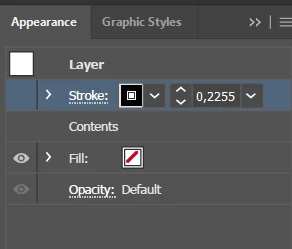
2 replies

Charu Rajput
Community Expert
Community Expert
January 22, 2025

Hi,

It sounds like you might have accidentally enabled the "Show Edges" feature in Adobe Illustrator, which causes the paths and anchor points to display permanently. To turn it off, follow these steps:


1. Hide Edges:

  • Go to the View menu at the top of the screen.
  • Make sure that Show Edges is unchecked. If it's checked, click on it to uncheck and hide the path outlines.

2. Toggle with Shortcut:

  • You can also toggle the visibility of the edges by pressing Ctrl + H (Windows) or Cmd + H (Mac). This will hide or show the path outlines and anchor point.


Let me know if that helps!

Best regards
jolan2020Author
Inspiring
January 22, 2025

Merci de votre réponse mais malheureusement cela n'a pas marché...

Monika Gause
Community Expert
Community Expert
January 22, 2025

Can you please show this in the layers panel?

You might have applied a stroke to the layer or group.

jolan2020Author
Inspiring
January 22, 2025

celui la ?