Participating Frequently
September 1, 2020
Answered

Line through text

  • September 1, 2020
  • 3 replies
  • 924 views

Hello,


How do i make a line go through my text? I want the yellow line to go through my text without overlapping.

Here is how it looks:
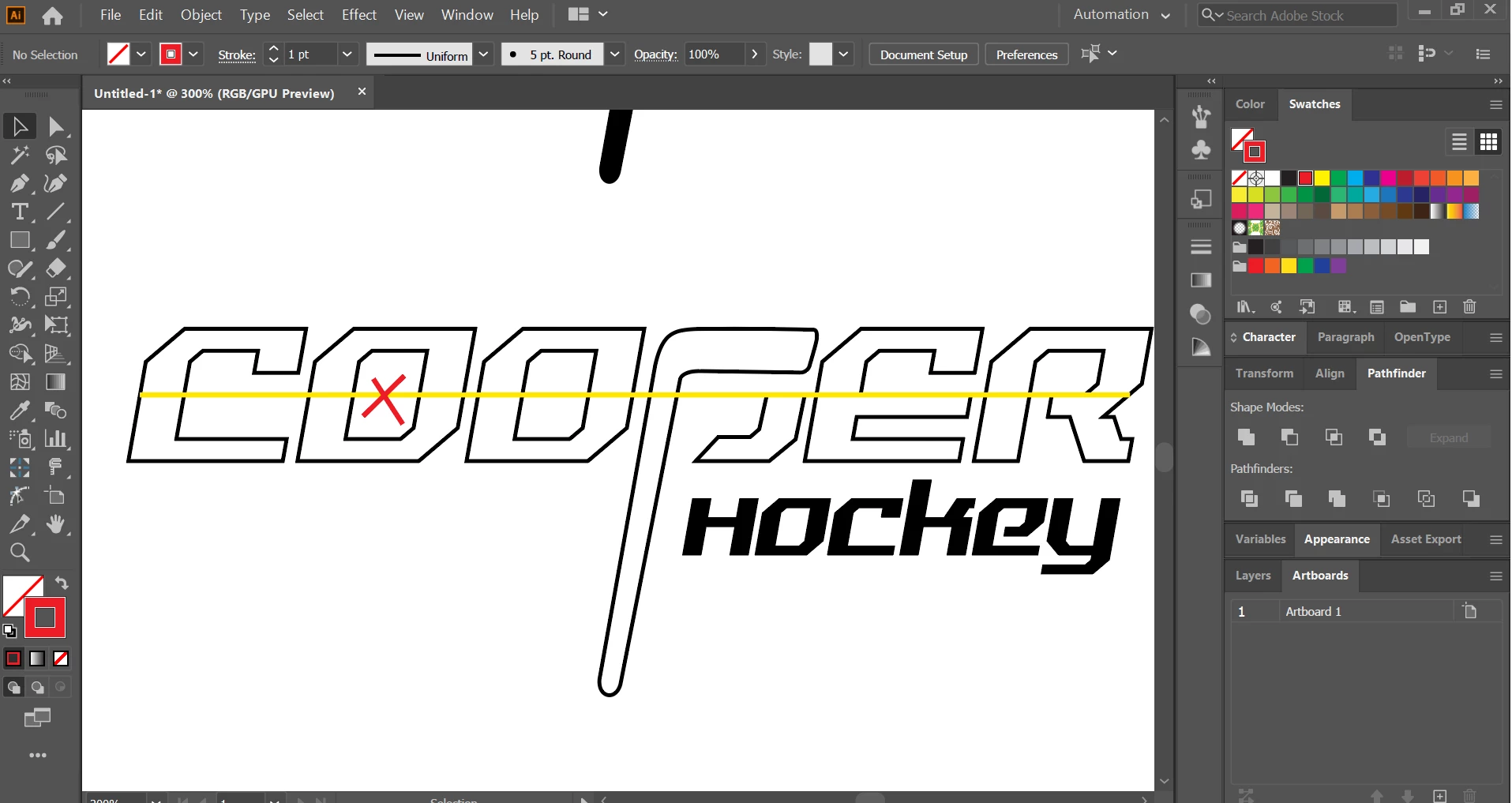
This topic has been closed for replies.
Correct answer Monika Gause

Like this but without having to do it manually bcs i made this by cropping the line and having to make a line for each letter


Ah, OK!

So you want to make a clipping mask.

If the text is already outlined, make sure it's a compound path. Then put on top of the line, select both and Object > Clipping mask > Make.

Then select the path of the mask with the direct selection tool and apply the stroke.

3 replies

Kurt Gold
Community Expert
Community Expert
September 1, 2020

As far as I understand the request, the desired result is a line across the entire word that should not appear on (or behind) the counters and between the single characters.


If that assumption is true, I'd recommend to draw a line below the type object, align as desired, select both and then make a clipping mask. After that you may have to direct select the type object again and give it a stroke or fill attribute.

LamijasuAuthor
Participating Frequently
September 2, 2020

Didnt really work out well i tried it, thanks

John Mensinger
Community Expert
Community Expert
September 1, 2020

Put the line behind the text. Select the line and choose Object > Arrange > Send to Back

LamijasuAuthor
Participating Frequently
September 2, 2020

I just replied to another comment by how i want it too look like, hope u can help now, thanks

Monika Gause
Community Expert
Community Expert
September 1, 2020

What do you mean by "Without overlapping"?

LamijasuAuthor
Participating Frequently
September 1, 2020

Overlapping like the crossed with a red X for example in letter O. I only want the line through text not over it, sorry if i used a wrong term. 

Monika Gause
Community Expert
Community Expert
September 1, 2020

I'm sorry I don't get it. Please draw a sketch.