Participating Frequently
December 28, 2023
Answered

Lines extend past shape when using shape builder tool to color
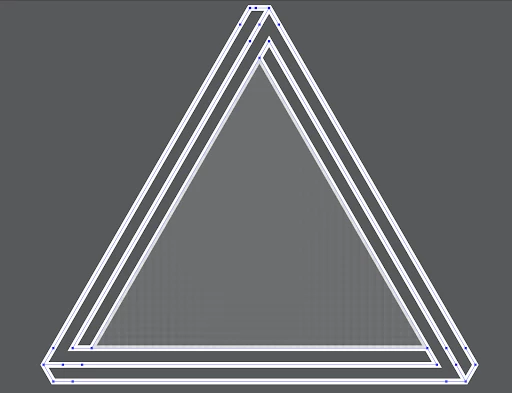
  • December 28, 2023
  • 2 replies
  • 616 views

I also cannot seem to understand joining lines, im takin a little class and the teacher made this triangle. I did not see him have to manually join any lines, he just had nice corners after using the shape builder tool. I had to manually join them because it left gaps like this:

maybe that is the reason they are extending past the shape. Im just gettin real stuck here would really appreciate any help! Here is the dropbox link to download the file. 


Dropbox Link 

This topic has been closed for replies.
Correct answer Monika Gause

Yes, in that sample he used the shapebuilder tool. 

If he ran into the same problem (and yes, he must have run into it) and didn't tell, then ... well ...  You might want to check out Tony Harmer's  or Laura Coyle's trainings.

You can of course apply round corners and rounded caps to the stroke, but then of course they will be rounded.


Or you can duplicate the paths and have separate shapes for the files and for the strokes (the live paint tool will create that when you expand the artwork). 

2 replies

kphotopage
Legend
December 29, 2023

Aidan, my go to is usually Live Paint as Monika suggested. Here I am using Live Paint Strokes.

I random color as I work.

Here are the steps I used.


To recreate that Impossible Triangle, I used Object>Live Paint>Create.

I colored the exterior shape first, shown in pink.

Then I recolored the inside strokes. Each a unique color.

Use stroke color of None to discard the strokes you do not need.


Next, Expand Live paint. Ungroup.

Select one of the colors, Select>Same>Stroke color. Then Object>Path>Join.

Do for each of those color.

At the end, you should have 1 close path and 3 open paths.


At the end, you can Group and recolor as one color.

Hope that helps.

K

Monika Gause
Community Expert
Community Expert
December 28, 2023

Did you teacher use live paint or did they use the shapebuilder tool. With Live paint you shape will work as is. If your teacher used the shapebuilder tool, then they probably cheated somewhere and you should ask them about it.

AidanRuizAuthor
Participating Frequently
December 28, 2023

Unfortunatley i cant talk to him. Its just a series of videos, but he did use the shape builder tool. Here is a 20 second clip from the class (trimming with shape builder and getting corners instead of gaps) maybe im missing something that you'll see. Could it just be differnt stroke caps?