

MahaB82A
August 30, 2025
Question

Link between specify object number & final result

  • August 30, 2025
  • 1 reply
  • 379 views

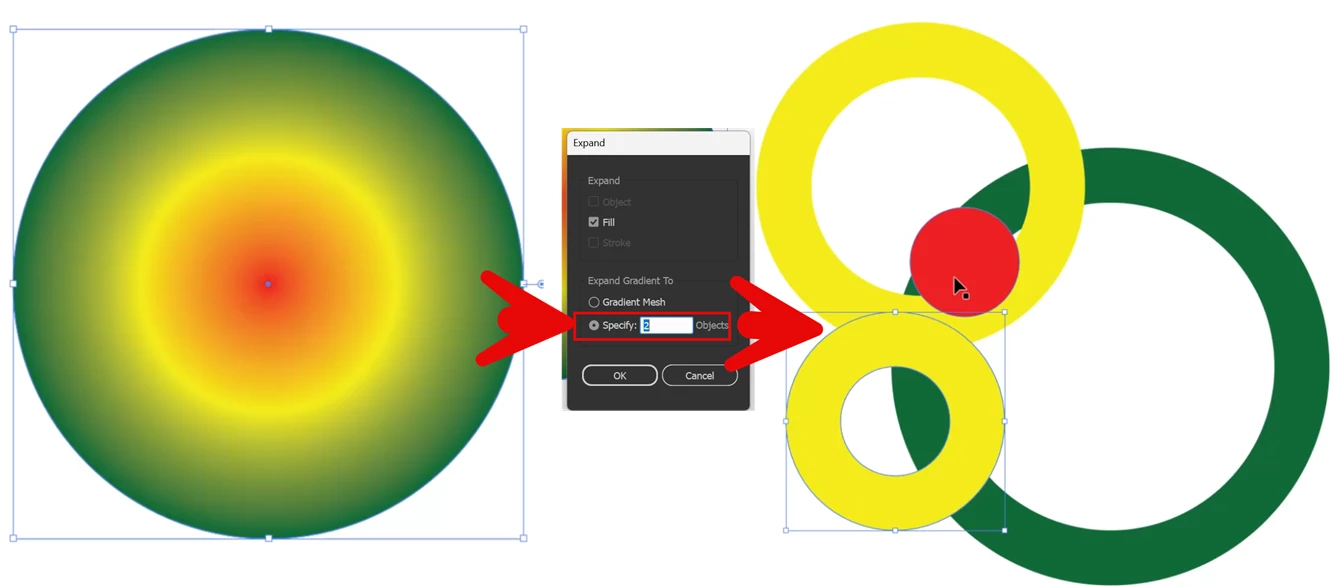
What is the link between specify object number in expand & final result? If I selected 2 final result has 4 separate images. Video also uploaded.



1 reply

Ares Hovhannesyan
Community Expert
Community Expert
August 30, 2025

Set the options for the selected object:


  • Object: Expands complex objects, including live blends, envelopes, symbol sets, and flares.
  • Fill: Expands fills.
  • Stroke: Expands strokes.
  • Gradient Mesh: Expands gradients to a single mesh object.
  • Specify: Sets the tolerance for color values between color stops. Higher numbers help maintain a smooth color transition. Low numbers can create a more banded appearance.

As you can see Specify do not mean qantity of objects

MahaB82A
MahaB82AAuthor
August 30, 2025

In the above image you can see two yellow rings. Even though its seem like yellow, you say there is a subtle difference between those colors. 

Monika Gause
Community Expert
Community Expert
August 30, 2025

This expands a gradient into separate objects and you specify the number of objects. I haven't tested if the number you enter will awlays reliably match the number of objects that are generated.