Known Participant
October 3, 2019
Answered

linking 2019 illustrator to 2019 photoshop

  • October 3, 2019
  • 2 replies
  • 987 views

the cs6 method

1) place psd file into illustrator

2) make an edit to the psd file in photoshop

3) i check illustartor and, there is a dialog box that askes if i want to update the modified content


in the 2019 versions of illustrator and photoshop, 

step 3) does not happen... 

there is no dialog box to update the changes to the file in illustator

neither are the changes automatically made to the psd file in illustrator


does anyone know why?

This topic has been closed for replies.
Correct answer Bill Silbert

When placing the Photoshop file into Illustrator (using File>Place) make sure that in the dialog window that appears you have clicked on Options and chosen "Link" as shown in screen shot below. Note: you will have to have clicked on the file you're importing in this dialog window or the Link option will be grayed out.

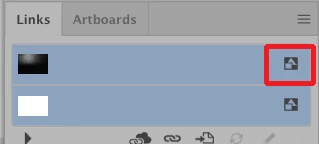
When working with a linked file rather than an embedded one Photoshop art will update in the way that you are looking for. You can always check the Links Panel to see if an image is embedded rather then linked. If an image is linked there will be no icon to the right of the image name. If it is embedded there will be the icon shown in the below screen shot.

2 replies

Bill Silbert
Community Expert
Bill SilbertCommunity ExpertCorrect answer
Community Expert
October 3, 2019

When placing the Photoshop file into Illustrator (using File>Place) make sure that in the dialog window that appears you have clicked on Options and chosen "Link" as shown in screen shot below. Note: you will have to have clicked on the file you're importing in this dialog window or the Link option will be grayed out.

When working with a linked file rather than an embedded one Photoshop art will update in the way that you are looking for. You can always check the Links Panel to see if an image is embedded rather then linked. If an image is linked there will be no icon to the right of the image name. If it is embedded there will be the icon shown in the below screen shot.

Known Participant
October 4, 2019
Thanks, Bill
Bill Silbert
Community Expert
Community Expert
October 5, 2019
Happy to help.
Monika Gause
Community Expert
Community Expert
October 3, 2019

What does not work? Placing the file? Or opening an AI file with a placed PSD?

Nothing has changed in that matter, so not sure what you mean.

Known Participant
October 3, 2019
edited**