
Participating Frequently
December 10, 2021
Question

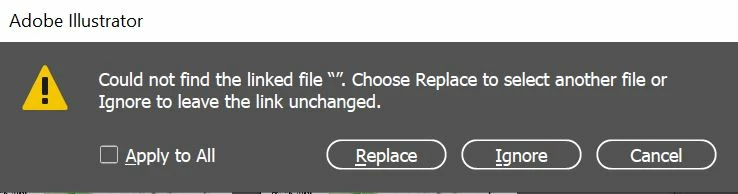
Links missing every time I open up a document and asks me to search for "" not an actual image name.

  • December 10, 2021
  • 5 replies
  • 707 views

I've worked on Illustrator for years and I just can't fathom out what's going on!


I place the images correctly, same way I usually do.


Can Illustrator crashing cause the problem do you think?


Thanking you in advance for your help.
This topic has been closed for replies.

5 replies

Anshul_Saini
Community Manager
Community Manager
December 31, 2021

Hi @fional1204@andy-mrio & @msolum,


Sorry to hear about the trouble you are facing. I would request you to share a few more details like:

  • The exact version of OS
  • Does updating to Illustrator v26.0.2 help resolve the issue?
  • When did this start happening? Are there any recent changes made to your system? For example, any antivirus, system updates, plugins, or web extensions installed recently.
  • Could you please share a sample document with us in which you are getting this popup? Please create a package from the file menu and upload that folder to the Creative Cloud/ Google Drive/ Dropbox and share the download link here or via DM.


We are here to help. We just need more information.


Thanks & Regards,

Anshul Saini

Met1
Legend
December 13, 2021

Has anyone suffering "constant" problems actually tried anything to resolve it like resetting prefs, or uninstalling, running the cleaner tool and reinstalling? Just saying "i tried everything" and "me too" doesn't help the forum to help you to resolve the issue.

Participating Frequently
December 13, 2021

Thanks for your reply


I updated Illustrator this morning, haven't used Illustrator that much today so don't know yet if it stops the problem, fingers crossed it does!


Participant
December 10, 2021

Me too, it is constant and no matter what I do it wont resolve the conflict. I also keep getting this one as well at the one about the search for"" too and it is so annoying. Constant pop ups "Some files are missing or modified in the Links panel. Would you like to update them now?" every time I open the document.

Participating Frequently
December 13, 2021

Wow it's not only me then!!!


Saving makes no difference the links are still lost.

Met1
Legend
December 10, 2021

Did Illy crash? Are you trying to recover a file?

Participating Frequently
December 10, 2021

It had crashed, more to do I think as was working in Photoshop too on large images. When I went back to Illustrator it had crashed without me having done anything.


Losing the links has been happening all week and I can't remember if it happened each time illustrator had crashed. 


My other Illustrator files I worked on this morning are finding their links ok.

Met1
Legend
December 10, 2021

"...each time illustrator had crashed...other Illustrator files I worked on this morning are finding their links ok"

Probably because they didn't crash and render the file unreadable.

I would have thought the continual crashing was more of a problem.

Did you just update?

Doug A Roberts
Community Expert
Community Expert
December 10, 2021

What do you see in the links panel?

Participating Frequently
December 10, 2021

Thank you for the reply.


As attached

Doug A Roberts
Community Expert
Community Expert
December 10, 2021

What happens if you click on one of those and then click the Go To Link button?