


Inspiring
September 23, 2026
Question

•  Live Interlace Gap (between shape/objects, not only between text letters)

Hello -


Background:
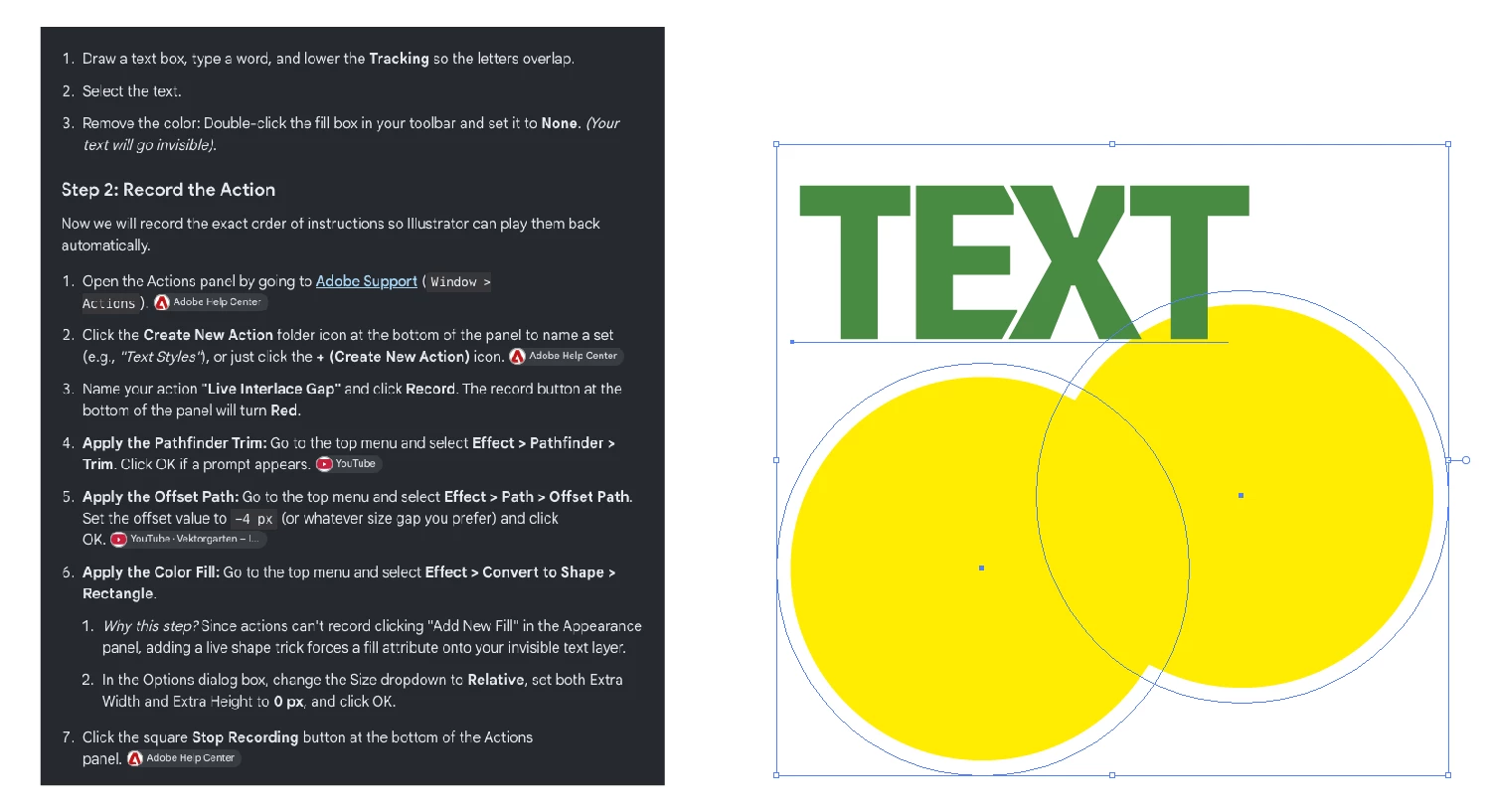
I recently came across a pretty interesting article/tutorial on how to leave a live interlace gap between each letter in a word (whether for creative reasons and/or because you need to interlace the letters).
And all of this while keeping the text editable. So it’s definitely a “Live” effect.
I try to make an “action” of it.
 

My question:
Is it possible to replicate this “Live” effect between two objects/shapes? Since until now I haven’t been able to do it.


Thank you.


    6 replies

    Inspiring
    September 24, 2026

    Thanks,
    In the meanwhile, I made a small script… Works also for me…  :-)


    /**********************************************************

    LIVE_INTERLACE_GAP_DC.jsx — V1.0
    BY: Dimitri Castrique aka the.bend

    Script equivalent of the "LiveInterlaceGap" action:
    1. Group the selected objects
    2. Effect > Pathfinder > Trim (live)
    3. Effect > Path > Offset Path -1 mm (live)

    /!\ VERIFY after first run: in the Appearance panel,
    "Trim" must sit ABOVE "Offset Path" (effects run top → bottom).
    If Offset Path lands above Trim, the result is wrong
    (shapes shrink BEFORE trimming → no gap).

    **********************************************************/

    #target Illustrator

    var OFFSET_MM_DC = -1; // Each shape shrinks by this → total gap = 2 × |value|
    var JOIN_TYPE_DC = 2; // 0 = Round, 1 = Bevel, 2 = Miter
    var MITER_LIMIT_DC = 4;

    function convertMillimetersToPoints_DC(mm_DC) {
    return mm_DC * 72 / 25.4;
    }

    function buildOffsetPathEffectXML_DC(offsetPt_DC, joinType_DC, miterLimit_DC) {
    return '<LiveEffect name="Adobe Offset Path"><Dict data="' +
    'R mlim ' + miterLimit_DC +
    ' R ofst ' + offsetPt_DC +
    ' I jntp ' + joinType_DC +
    ' "/></LiveEffect>';
    }

    function applyLiveInterlaceGap_DC() {
    if (app.documents.length === 0) {
    alert("No document is open.", "LiveInterlaceGap");
    return;
    }

    var doc_DC = app.activeDocument;

    if (!doc_DC.selection || doc_DC.selection.length === 0 || doc_DC.selection.typename === "TextRange") {
    alert("Please select the objects to interlace.", "LiveInterlaceGap");
    return;
    }

    try {
    // 1. Group
    app.executeMenuCommand("group");

    // 2. Effect > Pathfinder > Trim (live, same as the Effect menu item)
    app.executeMenuCommand("Live Pathfinder Trim");

    // 3. Effect > Path > Offset Path (live)
    var group_DC = doc_DC.selection[0];
    var offsetPt_DC = convertMillimetersToPoints_DC(OFFSET_MM_DC);
    group_DC.applyEffect(buildOffsetPathEffectXML_DC(offsetPt_DC, JOIN_TYPE_DC, MITER_LIMIT_DC));

    app.redraw();
    } catch (e_DC) {
    alert("LiveInterlaceGap error:\n" + e_DC.toString(), "LiveInterlaceGap");
    }
    }

    applyLiveInterlaceGap_DC();


    Translate
    Monika Gause
    Community Expert
    Community Expert
    September 23, 2026

    Making a graphic style does not work?

    It would help if you could just post screenshots of the Appearance panel and layers panel instead of having us read through this Chat GPT output.

    Translate
    Inspiring
    September 24, 2026

    Hi Monika — 


    Thanks for chiming in.

    We don't care about Gemini's response ;-)

    My question is, “Is this doable with/between two shapes/objects?”

    If so, what am I doing wrong that's preventing it from working the same way (as the text)?

    Thanks…


    Translate
    Monika Gause
    Community Expert
    Community Expert
    September 24, 2026

    Thank you! The problem is the compound path. Make it a group instead and then it will work. Text objects can be compared to groups, not compound paths.

    Translate