Inspiring
May 10, 2023 4:48 AM UTC
Answered

Live shape as clipping mask

Hi,

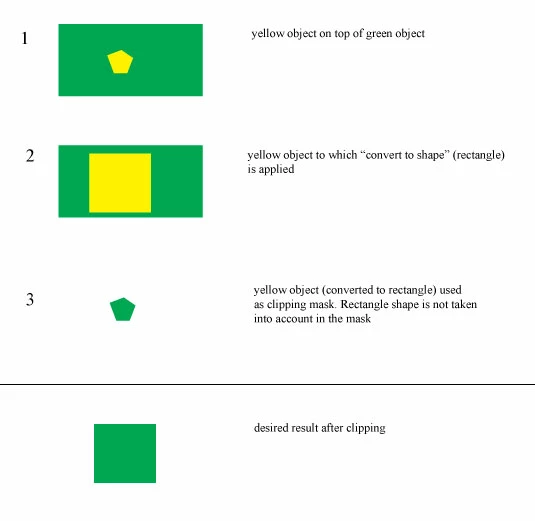
I have a yellow object that I convert to a rectangle shape using FX. I want to use that as a clipping mask on the green background object. While doing that, I would like to keep the yellow object and the rectangle shape applied to it as FX live.

I have not been able to achieve the desired result. I also looked at this thread but unless I did not understand it, that didn't work for me either.

https://community.adobe.com/t5/illustrator-discussions/clipping-mask-not-converting-into-shape-pathfinder-not-working/m-p/12096395


Attached is a picture of what I'm trying to do. This is for CS4. Thanks. 
This topic is closed to new replies. Start a new post to keep the conversation going.
Ton Frederiks
Ton FrederiksCorrect answer
Community Expert
May 10, 2023 8:08 AM UTC

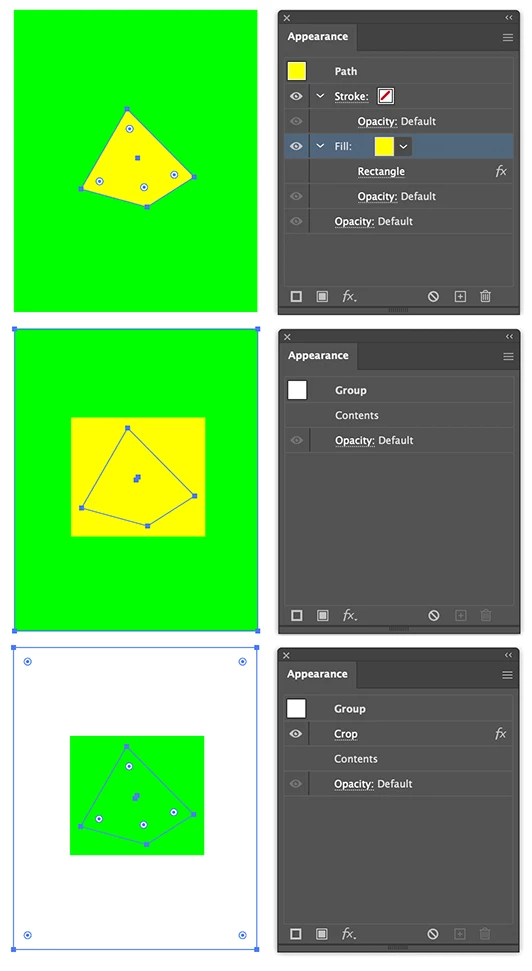
Create the 2 shapes and apply the rectangle effect to the top one.

Group both shapes and apply the Effects > Pathfinder >  Crop to the group.

6 replies

Ton Frederiks
Community Expert
Ton FrederiksCommunity ExpertCorrect answer
Community Expert
May 10, 2023 8:08 AM UTC

Create the 2 shapes and apply the rectangle effect to the top one.

Group both shapes and apply the Effects > Pathfinder >  Crop to the group.

Translate
sPretzelAuthor
Inspiring
May 10, 2023 8:16 AM UTC

Hi Ton. I ended up doing exactly that. However, I must say I still don't fully understand the Pathfinder behaviour.

Translate
Ton Frederiks
Community Expert
Community Expert
May 10, 2023 9:17 AM UTC

Yes it is sometimes difficult to visualize. Pathfinder as an Effect it must be applied to a group or used below the other items in the Appearance panel.

Translate
CarlosCanto
Community Expert
Community Expert
May 10, 2023 6:10 AM UTC

select both and create an opacity mask instead, would that work for you?

Translate
sPretzelAuthor
Inspiring
May 10, 2023 6:25 AM UTC

Hi CarlosCanto. No, opacity masks wouldn't work. I can't have transparency in the artwork.

Also, I don't want to expand the artwork (so it stays live).

Translate