November 20, 2018
Answered

Logo AI to PNG for web: bad quality! Please urgent help :(

  • November 20, 2018
  • 3 replies
  • 13561 views

Hello guys, super newbie here! I let create a logo for me from a guy that send me all the ai files. I'm not satisfied but that is another story What I really need, want but don't understand is how to save my ai file to web format (jpeg or png also in transparent version) WITHOUT lose quality. Every time I try to export, transform, resize them...I have for result a bad bad bad quality image.

If someone can help me would be so so appreciate and hope to send in pvt my logo's so that we can understand if this guy really made ai file in a resolution that I can modify like I want.

I can't upload a 3000x2000 file on Wordpress 😕😕
This topic has been closed for replies.
Correct answer sarapixels

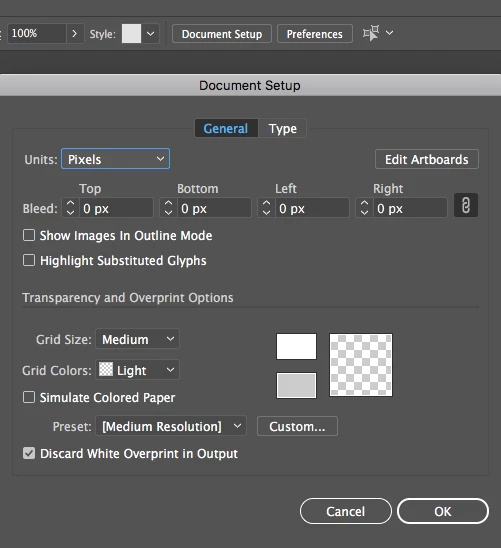
Look in the upper center of your window for a button that says Document Setup.  From there, you can set up what units you want to define and then click Edit Artboards to set your dimensions.

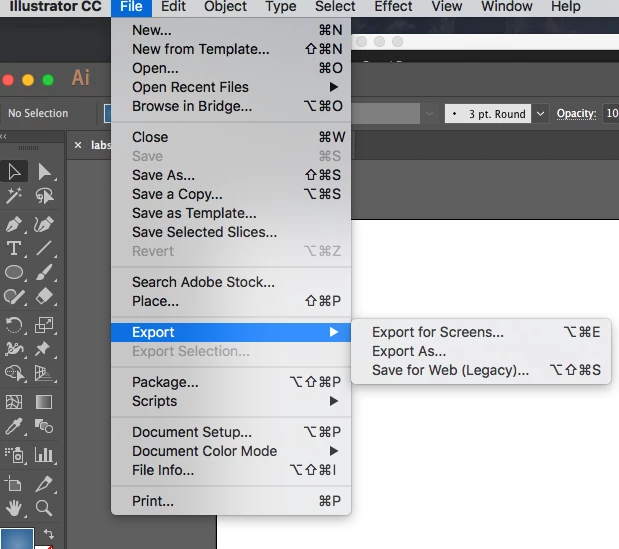
Then go the File pulldown menu to Export, I'm fond of Export As myself...

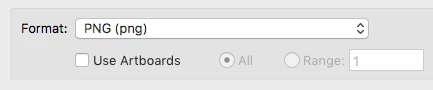
Decide what file type you want, and check the box to use the artboards you've defined.

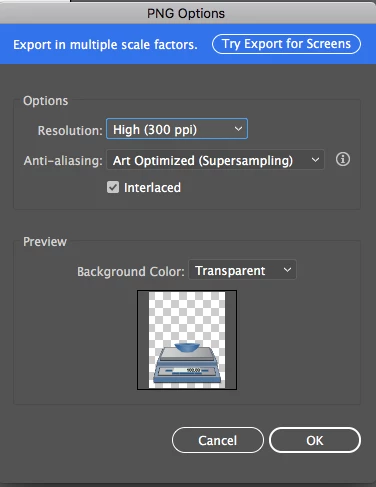
Then set your resolution and if you want transparency maintained.

Click OK and export your image.

3 replies

sarapixelsCorrect answer
Inspiring
November 20, 2018

Look in the upper center of your window for a button that says Document Setup.  From there, you can set up what units you want to define and then click Edit Artboards to set your dimensions.

Then go the File pulldown menu to Export, I'm fond of Export As myself...

Decide what file type you want, and check the box to use the artboards you've defined.

Then set your resolution and if you want transparency maintained.

Click OK and export your image.

November 20, 2018

ok doing like this went a little bit better but doing this I can't set the dimensions right? Or if the answer is yes, from where I can do this?

Inspiring
November 20, 2018

Edit Artboards is where you can set your dimensions. 

Inspiring
November 20, 2018

Your designer has given you the working .ai file.  That will not lose quality unless it contains a bitmap image.  There is no such thing as a magic jpg or png that will suit every occasion.  You will have to export what you want individually and specifically as needed.

November 20, 2018

what s the best way to export my ai file in png and set the exact size? Is there a guide that I never found?

Monika Gause
Community Expert
Community Expert
November 20, 2018

With a PNG I'd go File > Export > Save for web. There you check "Use artboards" if your artboard is set up in the correct dimensions and you can even enter different dimensions if needed

Monika Gause
Community Expert
Community Expert
November 20, 2018

When scaling down you lose detail.

When saving as a raster format you will lose quality. Don't expect it to be scalable

Don't expect details in it when there are only a few hundred pixels in each dimension.

November 20, 2018

ok but what's are then the benefits to create a logo in Illustrator that I know be "pixel and dimension free"? How can I have a logo that can be resized without loose any pixels and quality in all formats? So if I understand you right, I have my ai files that I must take for what they are and that if I export them in a web format I will have 100% and forever bad and pixelated images? Ummmm

Monika Gause
Community Expert
Community Expert
November 20, 2018

Export am SVG and you will be able to scale it. But since Social media sites don't accep SVG, you will need some format they accept, so you need to live with a crappy PNG or JPG. Those are raster based formats and when your designer doesn't know how to create gorgeous looking content under those conditions then maybe that's your issue.

Please read this: Raster graphics - Wikipedia