
JWearing23
Participating Frequently
August 18, 2017
Answered

Logo background will NOT export with transparent background - How do I export it?

  • August 18, 2017
  • 3 replies
  • 24905 views

For whatever reason, If I attempt to follow the suggestions on this forum, or tutorials on YouTube I cannot export a PNG file of my logo with a transparent background.

I have tried on Illustrator and Photoshop multiple times. On Illustrator I tried the Transparency Grid method. Everything except my logo is marked as transparent but when I export as a PNG it does not work. In Photoshop I tried the Magic Eraser Tool to mark the non-selected Artboard/Canvas and it still does not work when exporting.

Can anyone please help me?

Thanks,

J.
This topic has been closed for replies.
Correct answer barbara_a7746676

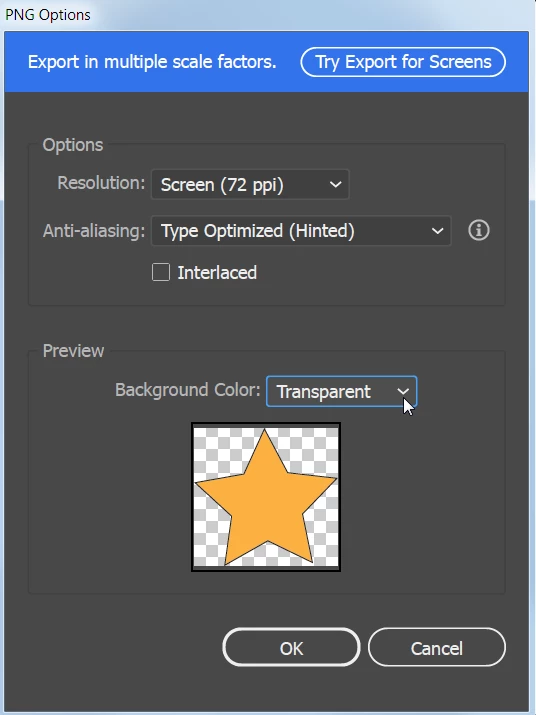
In Illustrator, File > Export > Export As, and choose Transparent.

3 replies

Monika Gause
Community Expert
Community Expert
August 18, 2017

What exactly is in your file?

How exactly do you export?

How exactly do you check transparency?

Why Photoshop?

JWearing23
Participating Frequently
August 24, 2017

Hi Monika, I originally assumed that I had to use Photoshop in order to make the logo file transparent. Thanks for your help.

Inspiring
August 18, 2017
  1. In illustrator make sure you have a transparent background. View>Show Transparency Grid.
  2. If yes then choose File>Export>Export for Screens. Choose PNG. This should be export with a transparent background. If it is not, then check your option using Advanced Settings by clicking on the gear. Make sure the Background Color is set to Transparent.
  3. If the software is still not working then reset your preferences (CTR+ALT+Shift or CMD+OPT+Shift when starting Illustrator) and try again.

JWearing23
Participating Frequently
August 24, 2017

And thank you as well Katie! I appreciate you taking out the time to answer the forum post.

barbara_a7746676
Community Expert
barbara_a7746676Community ExpertCorrect answer
Community Expert
August 18, 2017

In Illustrator, File > Export > Export As, and choose Transparent.

JWearing23
Participating Frequently
August 24, 2017

Thank you SO much for your help, Barbara!

barbara_a7746676
Community Expert
Community Expert
August 25, 2017

You're welcome, jwearing23. Were you able to solve the issue?