


Inspiring
February 13, 2026
Question

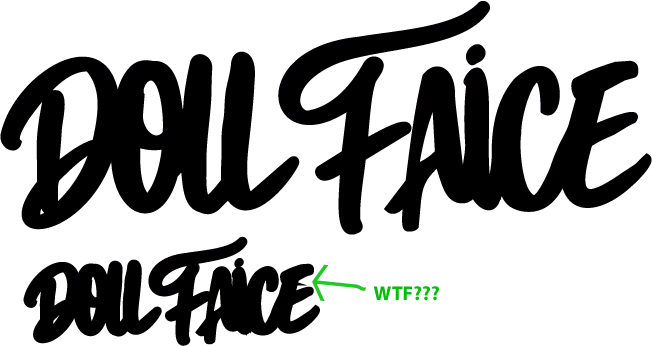
logo is changing when sized down

  • February 13, 2026
  • 2 replies
  • 0 views

i have created this logo from another logo and joined it together using shapebuilder. when i size it down it creates a horrible issue with the “E”. i have checked layers and outline view and there is nothing to suggest there’s an error. help!
 

    2 replies

    Conrad_C
    Community Expert
    Community Expert
    February 13, 2026

    I notice that the bowls (enclosed empty areas of letterforms) become smaller much faster than the black areas when the whole thing is reduced in size, and in some parts of the reduced logo, empty areas close up completely as in the space between the A, i, and C. That suggests that a stroke might be applied. If a stroke is applied, is it needed? If not, set stroke to None.


    If there is a stroke applied, there is a chance that the little part that sticks out of the C is because of extra unintended points forming a tiny corner on the path where scaling caused it to pass its miter Limit angle, an example is shown in the demo below. If that turns out to be the cause, you have three possible solutions:

    • Zoom in and delete the stray points forming the unwanted corner. This is a good solution because it would clean up the path.
    • If you don’t clean up the path, setting stroke to None. That would also help because then there would be no miter limit angle to worry about. 
    • You could also leave the path as is but adjust the stroke miter Limit until the spike goes way. But that would only be a workaround because if the path was scaled again, the spike could reappear.


    Bec MacAuthor
    Inspiring
    February 13, 2026

    Thanks for the detailed reply. However, I tried the tip below and that worked. Cheers.

    Conrad_C
    Community Expert
    Community Expert
    February 13, 2026

    It was just an idea, so it’s good to hear that you got the right answer from Ton!

    Ton Frederiks
    Community Expert
    Community Expert
    February 13, 2026

    There is an option in the Transform Panel (and other places as well) to Scale Strokes and Effects.

    Is that turned on?

    Bec MacAuthor
    Inspiring
    February 13, 2026

    Lovely, thanks that worked.

    Ton Frederiks
    Community Expert
    Community Expert
    February 13, 2026

    Good to hear that worked!