

PaintedStuff
Known Participant
August 18, 2022
Answered

Looking for a particular brush or stroke

  • August 18, 2022
  • 2 replies
  • 918 views

There is a stroke (see the red one) that has a scissor in the corner.  For this example, I added dashes.  I believe there once was a stroke or brush like the one I created in this mock-up in Photoshop that had scissors all around.  Useful for creating a coupon or something else to indicate the item should be cut out. 

Anyone know if it's still in Adobe Illustrator or available as an Adobe download?
This topic has been closed for replies.
Correct answer chrisg11235813

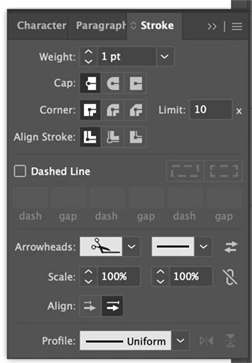
The option is in the Stroke pallet, under Arrowheads

2 replies

chrisg11235813
chrisg11235813Correct answer
Participating Frequently
August 19, 2022

The option is in the Stroke pallet, under Arrowheads

chrisg11235813
Participating Frequently
August 19, 2022

*break up your stroke. each line you dra will have the scissors.

PaintedStuff
Known Participant
August 20, 2022

Not optimal but doable, thanks 😊 

"Creative minds have always been known to survive any kind of bad training."-Anna Freud
Ton Frederiks
Community Expert
Community Expert
August 18, 2022

The scissor is available in the Zapf Dingbats (and probably other) font.

It is easy to outline it and make it into a brush.

PaintedStuff
Known Participant
August 19, 2022

Thanks, but it would sure be easier to find the brush or stroke! 😉

"Creative minds have always been known to survive any kind of bad training."-Anna Freud
Monika Gause
Community Expert
Community Expert
August 19, 2022

That brush is not so straightforward to create. What you need to make these, is a double approach. You need a dashed line for the dashes and then a scatter brush as a second stroke for the scissors. Your dashed line will have to be fairly ugly and not aligned on the corners for this to work.


In your example it looks like the scissors have been placed manually (they are different on the sides of the rectangle.


demo file: https://www.dropbox.com/s/k2x4px03p936ja8/scissors.ai?dl=0

Check out the brush in the brushes panel and everything else in the Appearance panel