Inspiring
February 9, 2011
Answered

Looking for a way to test if the lines in a path intersect any objects?

  • February 9, 2011
  • 1 reply
  • 3260 views

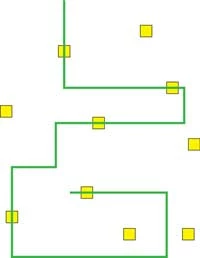
What i'd like to do is select an open ended path, and generate an array of all the objects that path intersects.  Here's an image to illustrate:

The green line would be selected.  The script would run and populate an array with pointers to each yellow square the line intersects.  Does anyone have any ideas on how this can be done in javascript?  Or if it is possible at all?  Help is appreacited, thanks!

This topic has been closed for replies.
Correct answer CarlosCanto

what?? a new document function?? I'm not kidding CS5 DOM has a new function!!! I know...it is hard to believe. And with it, new doors seem to open, like testing if a path intersects little yellow squares...no math required.

selectObjectsOnActiveArtboard() //

#target Illustrator

/* loops thru all objects to test for intersection with
    a path (path must be top object), start with nothing
    selected. Script assumes, 1 artboard.
*/

var idoc = app.activeDocument;
var yellowSq = idoc.pathItem;
var abRect = idoc.artboards[0].artboardRect;
var tempRect = abRect;
var yellowSqs = [];

for (i=1;i<=idoc.pathItems.length-1;i++)
    {
        yellowSq = idoc.pathItems;
        idoc.artboards[0].artboardRect = yellowSq.visibleBounds;
        idoc.selectObjectsOnActiveArtboard();
       
        if (idoc.pathItems[0].selected)
            {
                //alert ("yes!!");
                yellowSq.fillColor = idoc.swatches["White"].color;
                yellowSqs.push(yellowSq);
            }
        idoc.pathItems[0].selected = false;
        yellowSq.selected = false;
        }
   
    idoc.artboards[0].artboardRect = tempRect;
   
   alert("the green line intersects " + yellowSqs.length + " yellow squares");
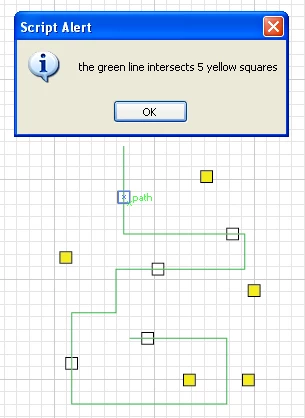
update: added snapshot

Message was edited by: CarlosCanto
1 reply

Inspiring
February 11, 2011

Sure it's possible. If all of your objects-to-cross are rectangles (as in your image), it's even quite trivial.

(15 minutes later) Oh well, perhaps not "trivial" -- I'd have to check at home whether or not I got a full-fledged rectangle intersection code. This doesn't work -- the "crossObject" function needs a bit more work.

At least it'll give you something to look at.

if (app.selection.length != 1)
alert ("Wot no single path selected?");
else
{
if (!(app.selection[0] instanceof PathItem))
  alert ("Wot no path?");
else
{
  allObjects = [];
  for (i=0; i<app.activeDocument.pageItems.length; i++)
   if (!app.activeDocument.pageItems.selected)
    allObjects.push (app.activeDocument.pageItems);
  thePath = [];
  for (i=0; i<app.selection[0].pathPoints.length; i++)
   thePath.push ([ app.selection[0].pathPoints.anchor[0],app.selection[0].pathPoints.anchor[1] ] );
  
  app.selection[0].selected = false;

  for (i=0; i<thePath.length-1; i++)
  {
   for (j=0; j<allObjects.length; j++)
   {
   // only check if necessary
    if (allObjects.selected == true)
     continue;
    if (crossObject (thePath, thePath[i+1], allObjects))
     allObjects.selected = true;
   }
  }
}
}

// .. to do .. (dis doesn't work)
// (check Liang-Barsky or Cohen-Sutherland viewport clipping)
function crossObject (a, b, obj)
{
var xl = obj.visibleBounds[1];
var xr = obj.visibleBounds[3];
var yt = obj.visibleBounds[0];
var yb = obj.visibleBounds[2];

var x1 = a[0],y1 = a[1];
var x2 = b[0],y2 = b[1];

// if point is inside object, it (obviously) hits
if (x1 > xl && x1 < xr && y1 > yt && y1 < yb)
  return true;
if (x2 > xl && x2 < xr && y2 > yt && y2 < yb)
  return true;

return false;
}

Muppet_Mark-QAl63s
Inspiring
February 13, 2011

In your example none of your selected path's points actually fall within your other shapes bounds what you could do is travel down your path creating imaginary points along that path. Then test if these fall inside the bounds of each of your shapes. This kind of stuff is too complicated math for me. This should give you the general idea of what I mean. You don't need these as path points (just x & y co-ords to test against) but it shows the principle all be it very basic (like my math)…

function activeDoc() {            if (app.documents.length == 0) {                      alert('NO document open?');           return;      } else {                      var docRef = app.activeDocument;                      var docSel = docRef.selection;                      if (docSel.length == 1 && docSel[0].typename == 'PathItem') {                                var pPoints = docSel[0].pathPoints;                                for (var i = 0; i < pPoints.length-1; i++) {                                               var start = pPoints.anchor;                                               var end = pPoints[i+1].anchor;                                               pointsInBetween(start,end,20);                                          }                                if (docSel[0].closed) {                                          var start = pPoints[pPoints.length-1].anchor;                                          var end = pPoints[0].anchor;                                          pointsInBetween(start,end,20);                                     }                           }                 }       } activeDoc(); function pointsInBetween(s,e,t) {            for (var i = 1; i < t; i++) {                 var x = s[0] + ((e[0] - s[0]) / t) * i;                 var y = s[1] + ((e[1] - s[1]) / t) * i;                 var a = app.activeDocument.pathItems.add()                 var b = a.pathPoints.add()                 b.anchor = Array(x,y)           b.leftDirection = b.anchor;           b.rightDirection = b.anchor;           b.pointType = PointType.CORNER;            } }

CarlosCanto
Community Expert
CarlosCantoCommunity ExpertCorrect answer
Community Expert
February 14, 2011

what?? a new document function?? I'm not kidding CS5 DOM has a new function!!! I know...it is hard to believe. And with it, new doors seem to open, like testing if a path intersects little yellow squares...no math required.

selectObjectsOnActiveArtboard() //

#target Illustrator

/* loops thru all objects to test for intersection with
    a path (path must be top object), start with nothing
    selected. Script assumes, 1 artboard.
*/

var idoc = app.activeDocument;
var yellowSq = idoc.pathItem;
var abRect = idoc.artboards[0].artboardRect;
var tempRect = abRect;
var yellowSqs = [];

for (i=1;i<=idoc.pathItems.length-1;i++)
    {
        yellowSq = idoc.pathItems;
        idoc.artboards[0].artboardRect = yellowSq.visibleBounds;
        idoc.selectObjectsOnActiveArtboard();
       
        if (idoc.pathItems[0].selected)
            {
                //alert ("yes!!");
                yellowSq.fillColor = idoc.swatches["White"].color;
                yellowSqs.push(yellowSq);
            }
        idoc.pathItems[0].selected = false;
        yellowSq.selected = false;
        }
   
    idoc.artboards[0].artboardRect = tempRect;
   
   alert("the green line intersects " + yellowSqs.length + " yellow squares");

update: added snapshot

Message was edited by: CarlosCanto