


Participating Frequently
July 31, 2017
Answered

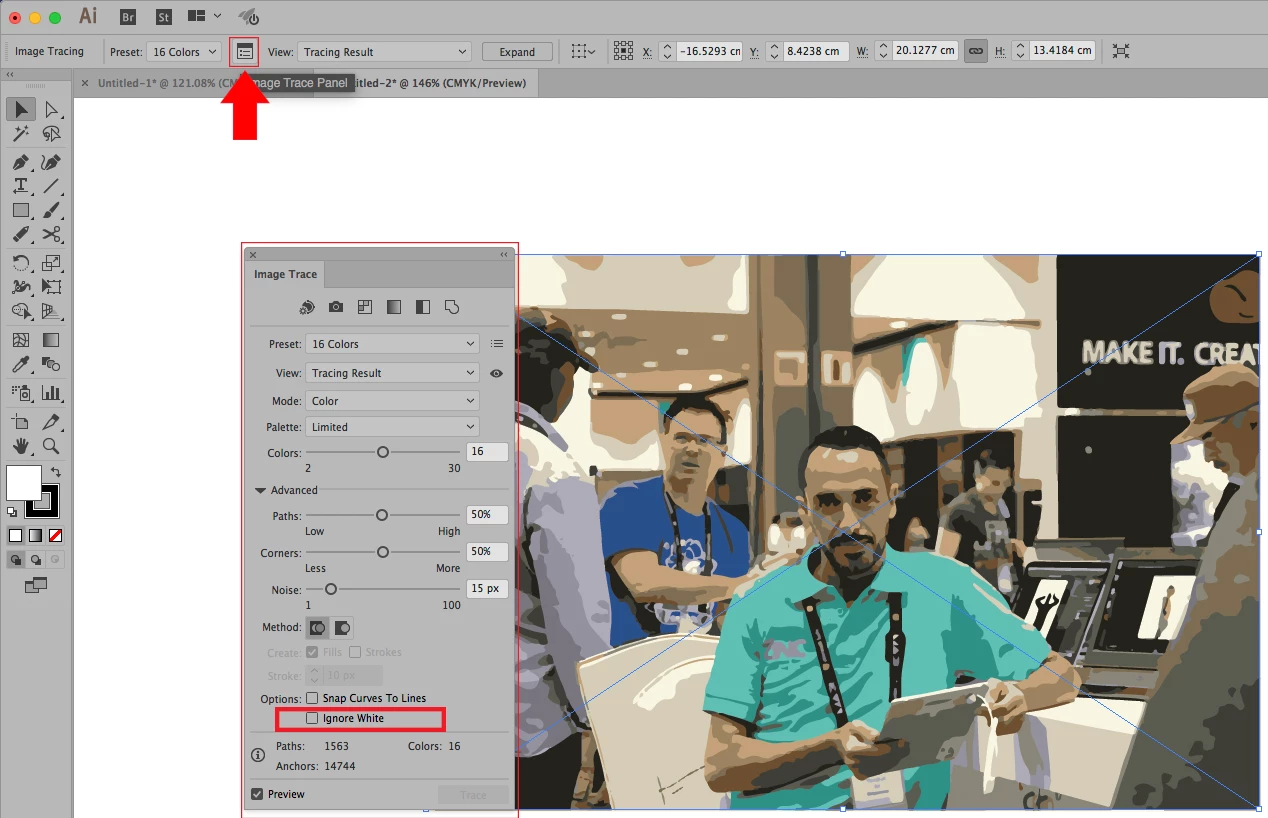
Looking for the "ignore white" button when importing drawings from PS to Ai

I'm working on finding good techniques for transferring drawings that I have scanned in Photoshop into Illustrator, and found some old notes from a teacher that said

"Trace", then Advanced Panel, then Ignore White, then Expand, but I can't remember how to find "ignore white".

MEDHAT EID
MEDHAT EIDCorrect answer
Community Expert
August 1, 2017

7 replies

Participant
May 13, 2025

I am attempting a repeat pattern and cannot get rid of the whie border. Help

Translate
Ton Frederiks
Community Expert
Community Expert
May 13, 2025

Is this about tracing or just using an image as a pattern?

If it is about using an image as a pattern, can you show the Pattern Maker dialog with your image?

Translate
MEDHAT EID
Community Expert
MEDHAT EIDCommunity ExpertCorrect answer
Community Expert
August 1, 2017

Translate
Sheena Kaul
Legend
August 1, 2017

Moving to Photoshop General Discussion​

Translate
davescm
Community Expert
Community Expert
August 1, 2017

Hi I've moved this to the Illustrator forum where you will get advice on the image trace function which is part of Illustrator.

Dave

Translate
Mylenium
Legend
July 31, 2017

Please read the help on the Image trace function. The tracing functions have been completely changed and refering to notes on older versions is not useful.

Mylenium

Translate