


December 15, 2015
Answered

Make a text file, xls or doc into layer names in Illustrator

  • December 15, 2015
  • 2 replies
  • 1014 views

I'm doing medical graphics.

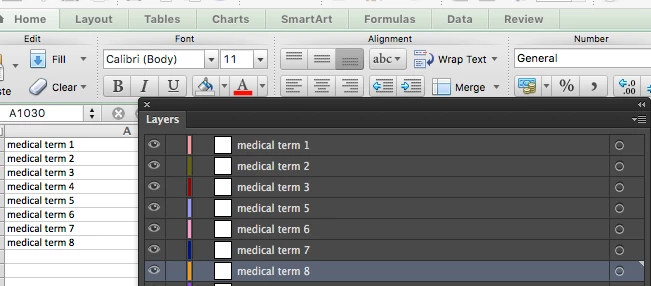
The doctor sent a spreadsheet with 1000 items and I need to draw them.

I would like to import his terms into layers, so I don't need to cut/paste 1K things.

Is there a existing script that can do this?

(I have almost zero coding skills)
Thanks!

This topic has been closed for replies.
Correct answer Silly-V

Sure:

function LayersFromColumns(){

     var doc = app.activeDocument;

     var src=File.openDialog("Pick a single-column .txt file");

     if(src== null){

          return;

     }

     var contents;

     src.open('r');

     contents = src.read();

     src.close();

     var layerNames = contents.split(/\n/g);

     var thisLayer;

     for(var i=0; i<layerNames.length; i++){

          thisLayer = doc.layers.add();

          thisLayer.name = layerNames[i];

     };

};


LayersFromColumns();


This is very basic, so you actually have to remove the default layer in a new document, or any existing layers if you already had some- because this thing will just append new layers.

2 replies

December 15, 2015

Silly-V, thanks! Works like a charm.

Silly-V
Silly-VCorrect answer
Legend
December 15, 2015

Sure:

function LayersFromColumns(){

     var doc = app.activeDocument;

     var src=File.openDialog("Pick a single-column .txt file");

     if(src== null){

          return;

     }

     var contents;

     src.open('r');

     contents = src.read();

     src.close();

     var layerNames = contents.split(/\n/g);

     var thisLayer;

     for(var i=0; i<layerNames.length; i++){

          thisLayer = doc.layers.add();

          thisLayer.name = layerNames[i];

     };

};


LayersFromColumns();


This is very basic, so you actually have to remove the default layer in a new document, or any existing layers if you already had some- because this thing will just append new layers.

Silly-V
Legend
December 15, 2015

Oh yea, the excel file will need to be saved as a single-column .txt file first, too.