MahaB82A
Legend
February 5, 2025
Answered

Make Default

  • February 5, 2025
  • 2 replies
  • 693 views

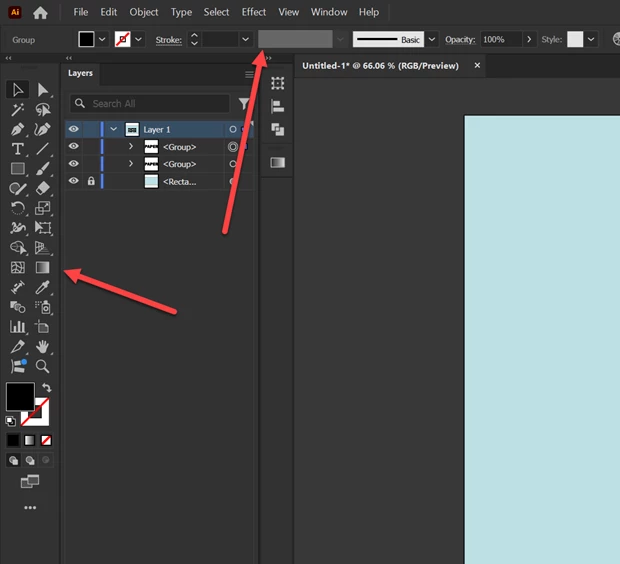
Is it possibe to make horizontal & vertical tool bar sitting default?


Correct answer Monika Gause

Once you have set up all the preferences, make a copy of them and keep it safe from the system. WHen it then happens and you are forced back, you can replace the settings with your saved ones. You could also try Edit > My settings > Export for that.

2 replies

Mike_Gondek10189183
Community Expert
Community Expert
February 5, 2025

Your last workspace configuration should come up. Saving it as Ton recommended is an excellent suggestion.

It would only change if you change it, or if your computer crashed and your prefs were not saved.

MahaB82A
MahaB82AAuthor
Legend
February 5, 2025

I am using four apps Ae, Pr, Ps & Ai. I do not have any issues with these apps other than Ai. My Ai crash frequently & loose my setting. If there is any why to retain all my setting eventhough it is crashed.  

Monika Gause
Community Expert
Monika GauseCommunity ExpertCorrect answer
Community Expert
February 5, 2025

Once you have set up all the preferences, make a copy of them and keep it safe from the system. WHen it then happens and you are forced back, you can replace the settings with your saved ones. You could also try Edit > My settings > Export for that.

Ton Frederiks
Community Expert
Community Expert
February 5, 2025

Try creating a workspace:

Window > Workspace > New Workspace...

MahaB82A
MahaB82AAuthor
Legend
February 5, 2025

Issue is if app crashed everything get deleted.
