Participating Frequently
October 22, 2023
Answered

Making depth cubes newbie question

  • October 22, 2023
  • 2 replies
  • 764 views

Hello,

I want to make this section into some depth cubes.

Could someone help point me to a guide on how to do this? 

Would the best way be to do some invisible strokes and offset the colors to make it appear as sharing & 3d?

This topic has been closed for replies.
Correct answer Ton Frederiks

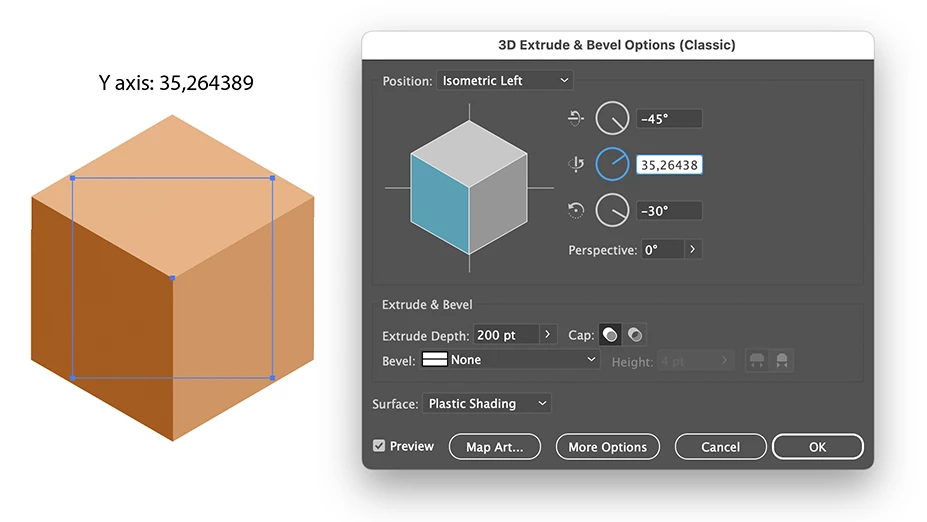
The Classic 3D effect will give the best results when you want to expand it as vectors (Object > Expand Appearance)

For the best precision you will need to change the Y axis, the new 3D effect already uses this angle, but the Classic one needs to have the Isometric Y changed to 35,264389
2 replies

Ton Frederiks
Community Expert
Ton FrederiksCommunity ExpertCorrect answer
Community Expert
October 22, 2023

The Classic 3D effect will give the best results when you want to expand it as vectors (Object > Expand Appearance)

For the best precision you will need to change the Y axis, the new 3D effect already uses this angle, but the Classic one needs to have the Isometric Y changed to 35,264389

kphotopage
Legend
October 22, 2023

I'm presently still using Illustrator 2020.

Here is a link I bookmarked long ago on this same topic

https://community.adobe.com/t5/illustrator-discussions/3d-rotate-isomatric-doesn-work-properly/td-p/8731093


K

Participating Frequently
October 22, 2023