

Participant
June 24, 2025
Question

Map Art on 3D Object - Pixelated Symbol Transfer

  • June 24, 2025
  • 1 reply
  • 103 views

Hi 

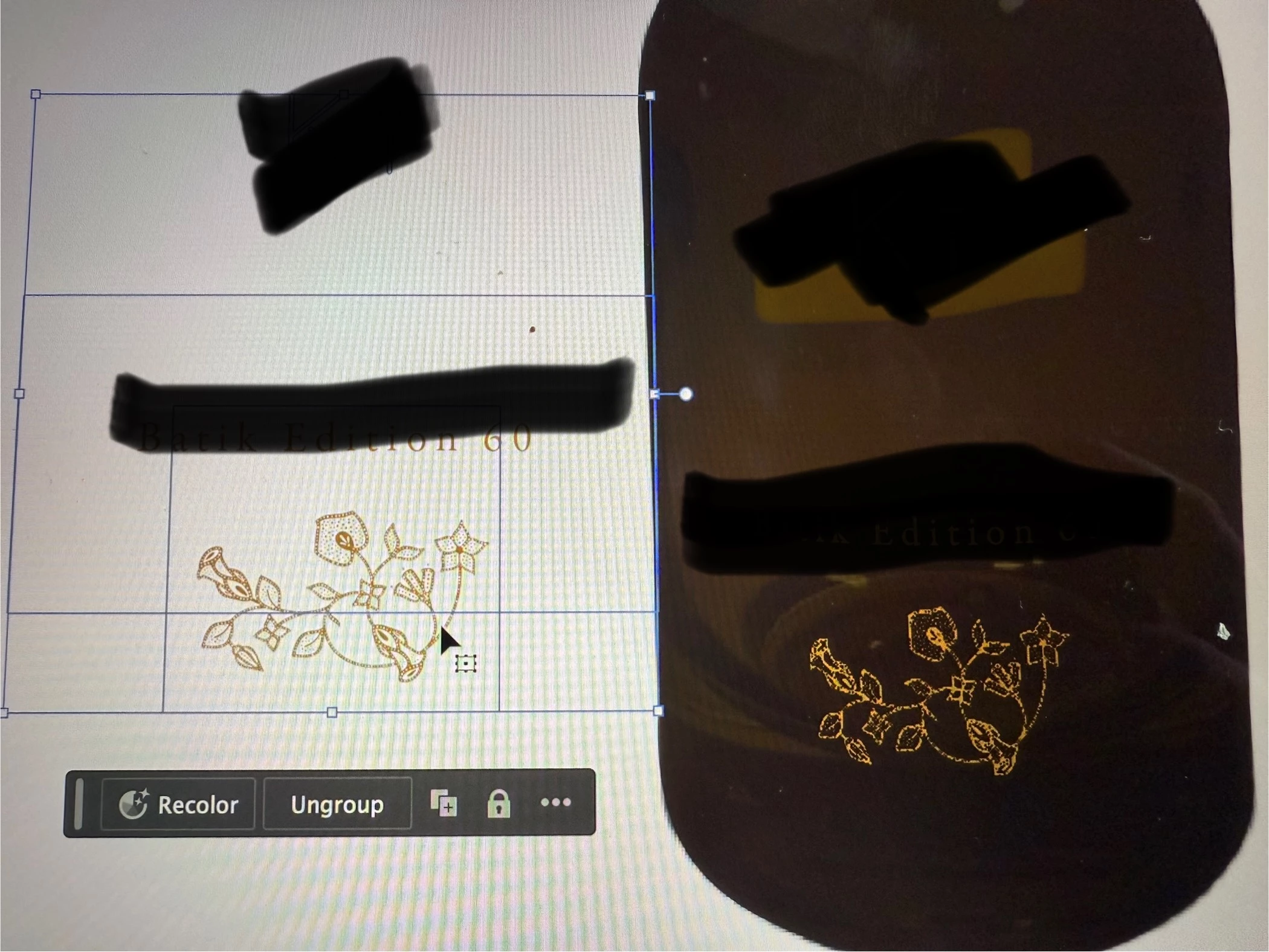
Please someone help me. I created a symbol with my artwork and transferred it to 3D. 

Why is the symbol becoming so pixelated once placed?


The original symbol is here left to compare:
 

1 reply

creative explorer
Community Expert
Community Expert
July 14, 2025

@Kiny21918481b1fa Look at the setting you need to adjust is the Document Raster Effect Settings. By default, this might be set to a lower resolution (e.g., 72 ppi for web). When your vector symbol is applied to a 3D object, it's converted to pixels at this resolution. If you're viewing it zoomed in, or if your final output requires high resolution, that 72 ppi will look pixelated. 

Go to Effect > Document Raster Effect Settings.  In the dialog box, change the Resolution from "Screen (72 ppi)" to "High (300 ppi)" or even "Other..." to enter a custom higher value (e.g., 600 ppi) if your project demands extreme detail for print.

Make sure Anti-aliasing is checked. Click OK. It might be a slight delay as Illustrator re-renders the 3D effect with the new, higher resolution.


m
