



rickert_ontwerp
Participant
March 1, 2026
Question

Massive lag when scrolling through character list

  • March 1, 2026
  • 4 replies
  • 95 views

So this issue started only a few days ago but it has made it so I can’t do any of my design work.

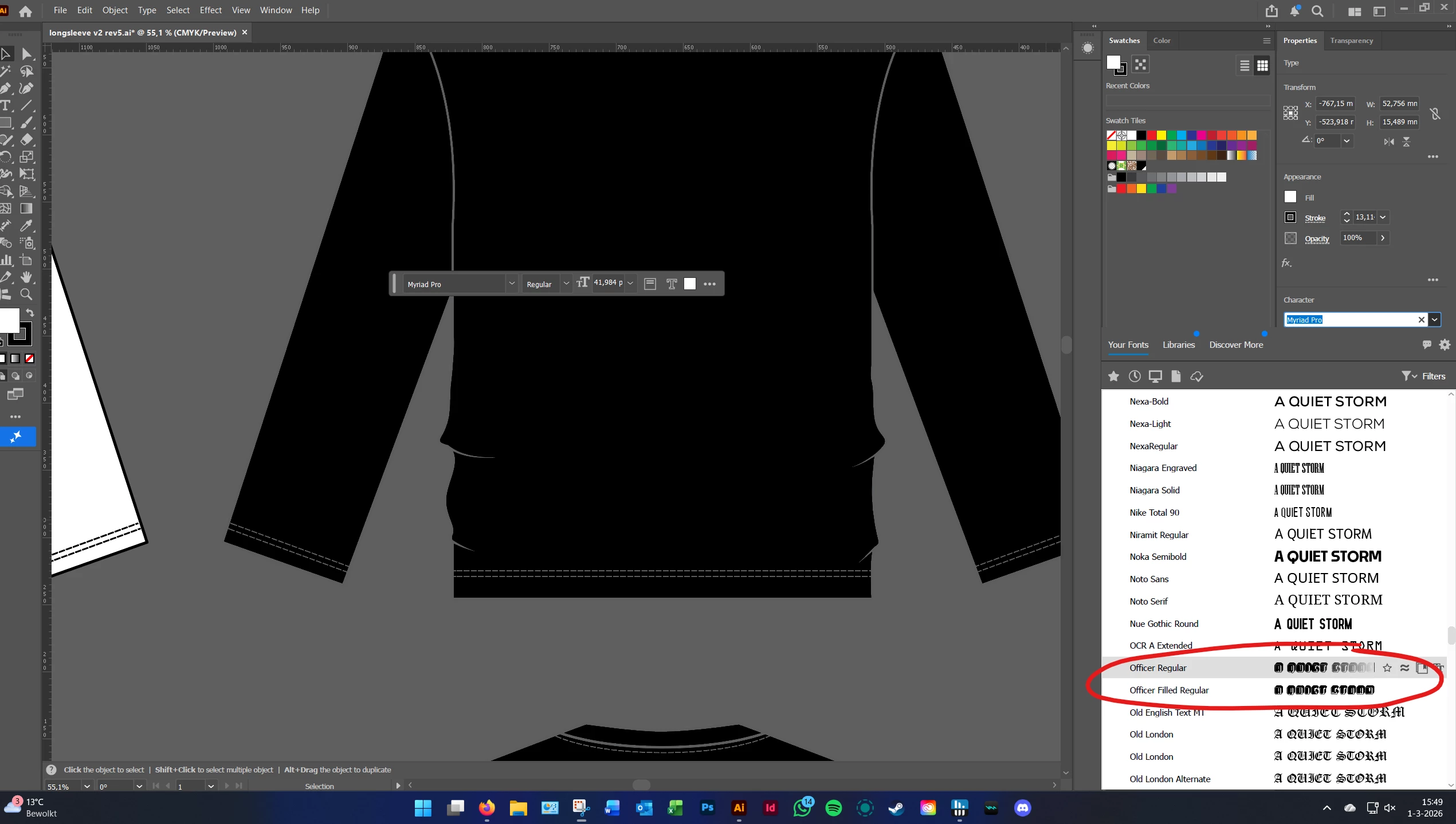
Illustrator laggs out for 30 seconds to a minute when I'm scrolling through the character lists and wanting to test different fonts for a design. This is sometimes not so bad, but with a little bit more graphically intense/ complicated fonts it is so bad. The program just completely decides to lagg out on me and I can't do anything about it.

I have tried to install other versions, redownload the newest versions, tried disabling the ‘Enable missing glyph protection’ and I have GPU performance mode on. Any idea's on what to fix?


My computer specs are:

AMD Ryzen 5 5600X 6-Core processor

32GB of RAM

Samsung SSD 970 EVO Plus

NVIDIA GeForce RTX 3060 Ti


Down here is a font example where illustrator freezes for 30 seconds to a minute
 

    4 replies

    rickert_ontwerp
    Participant
    March 3, 2026

    alrighty so I've been able to resolve the issue. It was definitely the graphically intens or non optimised fonts. they were just adding too much stress on loading it in. and ontop of that i had outlines around my text making it even harder to preview render it i think (even though it was also happening in other files that were using blank texts. so all in all it was just putting too much stress on my system. after having deleted a fair few of those ‘design’ fonts it works great again!

    Harshika Verma
    Community Manager
    Community Manager
    March 2, 2026

    Hi rickert_ontwerp,
     

    Thank you for reaching out, and sorry to hear you’re experiencing lag while scrolling through the character list and thank you for sharing the details. I am unable to replicate the issue on my machine. A few more details would be super helpful for the investigation.

    • Would you mind telling us the version of Illustrator installed on your machine?
    • Does that happen with every file?
    • Is it possible for you to record a short video showing the lag? 
    • Have you noticed the issue with a specific font?

    We will try our best to help.


    Thanks,

    Harshika


    rickert_ontwerp
    Participant
    March 3, 2026

    i just posted and update!

    Kurt Gold
    Community Expert
    Community Expert
    March 1, 2026

    In the latest Windows version of Illustrator (30.2.1) I could not reproduce your issue when scrolling in the character list so far.


    But I noticed that Illustrator gets frozen for about one minute whenever you're clicking on the "Filters" dropdown menu (funnel icon) at the top-right in the "Your Fonts" section.


    Something is wrong here.

    Monika Gause
    Community Expert
    Community Expert
    March 1, 2026

    How many fonts are installed?

    If the preview in the menu is not important for you, you can turn it off in the Preferences.

    You could also set the recent fonts to 0

    rickert_ontwerp
    Participant
    March 1, 2026

    nearly 500 fonts on my computer, i disabled font preview and still the same lagg

    creative explorer
    Community Expert
    Community Expert
    March 2, 2026

    Dang. I have only 10 fonts showing! 

    m