


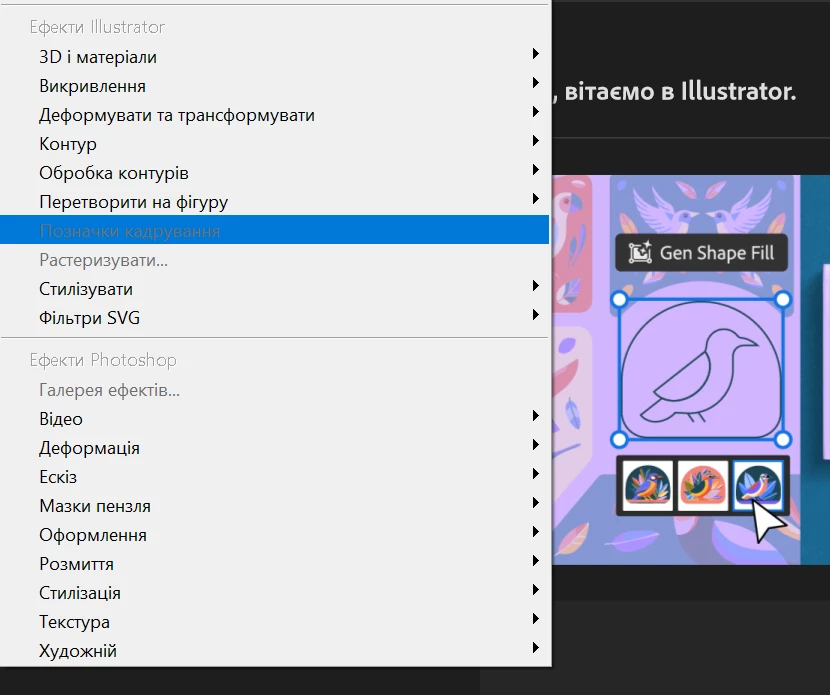
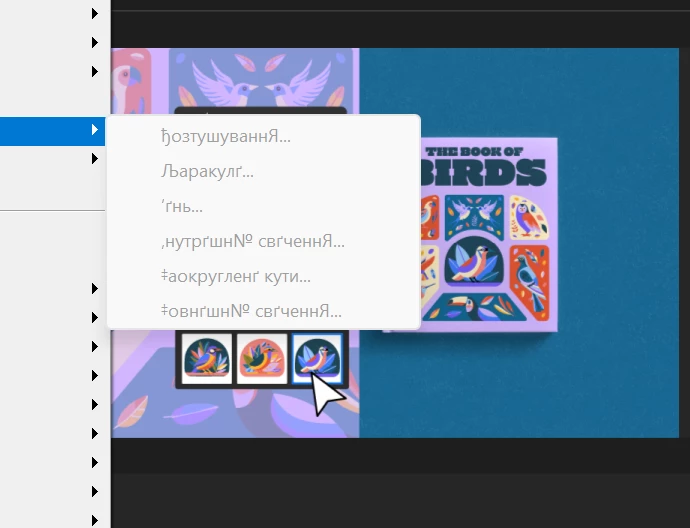
menu text turned into glyphs
Hello @Abhishek Rao @Anubhav M
Thank you for your support in the previous replies.
I’m opening a new message just to make sure my issue not lost,
To summarize everything I’ve already tested (based on your recommendations and my own checks):
✔ Clean Illustrator reinstall
✔ Reset preferences
✔ Updated Creative Cloud
✔ Installed Illustrator in a different language / changed UI language
✔ Cleared Windows font cache
✔ Renamed CEP and UXP folders
✔ Tested with a different Creative Cloud account
✔ Tested with a new local Windows administrator profile
✔ Verified that I do not use any font managers
✔ Tested Safe Mode
✔ Confirmed that the issue does not appear in Photoshop / InDesign — only in Illustrator
✔ Screen recording was provided in my previous message
Important:
After installing Illustrator 29 (an older version), the UI text displays correctly.
The glyphs appear only in Illustrator 30.0
So it looks like the issue is introduced in the latest update.
At this point I have tried every possible recommendation from your side, and the problem is still repeating only in Illustrator 30.0 after login.
Could you please Inform whether there is fix?
Thank you in advance.
 AdChoices