
Inspiring
June 29, 2024
Question

menu window length issue

  • June 29, 2024
  • 1 reply
  • 546 views

when i use illustrator in 2nd monitor, the menu window length gets short to match the height of the first monitor. so to use bottom function of the menu window, i need to keep click the arrow. it's bit annoy and i can't check all the fuction at once. is there any advice about this problem?


+ if i move illustrator to first monitor it works fine. but I usually run a differ program on the main(first) monitor, so I usually run illust on the second monitor.
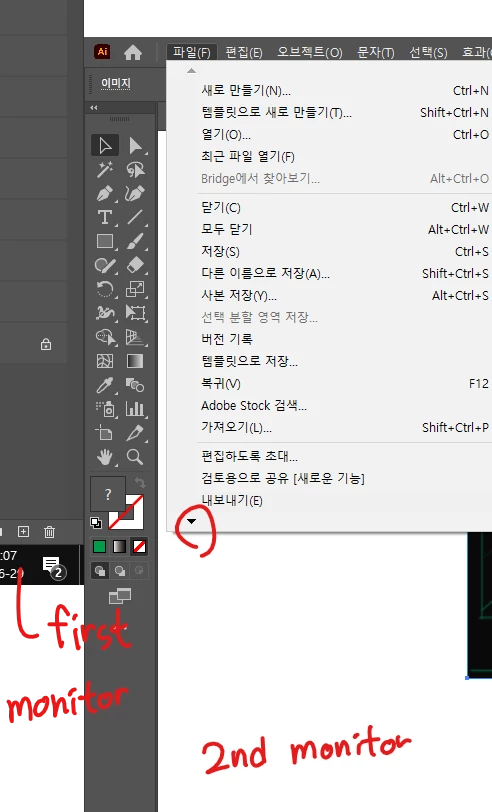


thank you for reading this 😄

This topic has been closed for replies.

1 reply

Community Expert
June 29, 2024

Hi musuron2,
I tried to replicate your situation on my devices as well but I am not sure I encountered the same problem as you. Could you give us more information about the devices you are using (PC, desktop, and adapters)? Thank you very much 🙂

musuron2Author
Inspiring
July 10, 2024

oops sorry for late answer 
monitor: LG 24MP47HQ /19V 1.3A
adaptor output: 19V 1.7A


Anubhav M
Community Manager
Community Manager
July 24, 2024

Hello @musuron2,

Thanks for sharing the details. Would you mind trying to change the resolution and scaling under the OS settings to the defaults for the monitor(s) (Windows / macOS), restarting your computer and then relaunching Illustrator to check if it helps? Also, change the Display option to Extend (https://adobe.ly/4cPdh7M) and share your observations.

Looking forward to hearing from you.


Thanks,

Anubhav