
Participant
November 5, 2024
Answered

Merge layers and create seperate objects to delete

  • November 5, 2024
  • 2 replies
  • 951 views

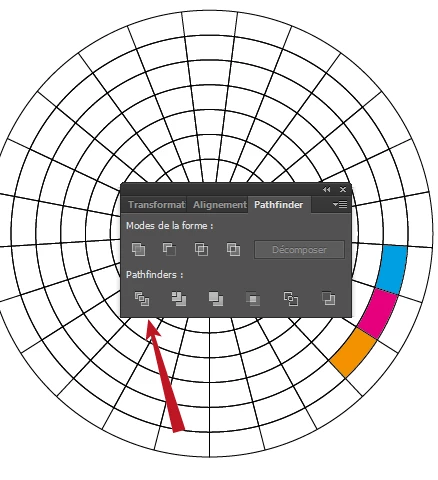
I have created multiple layers using Polar Grids, circles to hide elements of the polar grids, and numbers. Now I am trying to merge them all together to end up with the white spaces as objects so I can change the colours or delete.  Prefrably keep the numbers seperate so they sit in front of the (white) boxes.
> So in the end I want to be able to change the colours behind numbers individually.

> also be able to change the colour of the grey in different sections.

I'm not a big Illustrator user, mostly Photoshop. Couldn't find anything in the help.
Image trace not clear enough in conversion.

My Image is attached for reference.  
This topic has been closed for replies.
Correct answer JacC

Bonjour,

Peut être avec Pathfinder > Division

René


Bonjour René,


Genius!  Thankyou.  It didn't work straight away but I googled how to use this function and worked it out.  I hid all the layers that I didn't want to include and then did the Pathfinder > Divide.  Then erased areas that I didn't need.


Merci beaucoup

Jac


2 replies

Monika Gause
Community Expert
Community Expert
November 5, 2024

THis calls for Live Paint.


Select the grid (not the text) and then use the live paint tool. Make sure to turn on Gap detection. https://helpx.adobe.com/illustrator/using/live-paint-groups.html

JacCAuthor
Participant
November 5, 2024

When I select all the object layers (excluding numbers) the "Object > Life Paint" option in greyed out. 

Monika Gause
Community Expert
Community Expert
November 5, 2024

Perhaps there are clipping masks in it, but that is not visible in your layers screenshot. 

Maybe you can share that file?

JacCAuthor
Participant
November 5, 2024

Attached are my Layers