jano20721963
Participant
July 18, 2017
Answered

Merge line paths and a text (path)

  • July 18, 2017
  • 2 replies
  • 647 views

Hi!

I am trying to merge the text (GCC) and these lines, such that I only keep the text with the paths as "transparency" of the text (such that the background color shines through these lines). I am just starting with Illustrator and appreciate every help (I could not find any other thread on this - and was playing around with the pathfinder, without any success yet).

Thanks! And I apologize for the most likely very stupid question.

Jan
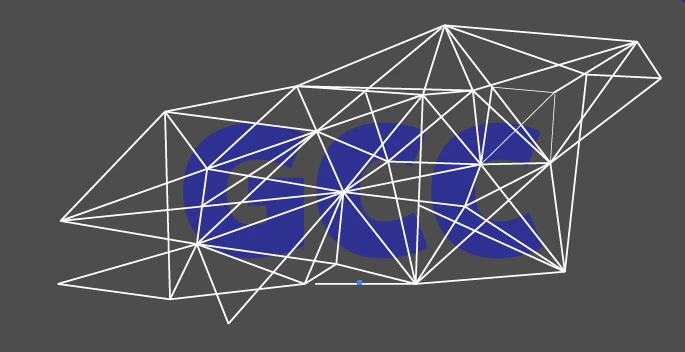
This topic has been closed for replies.
Correct answer Monika Gause

Color the lines in black.

Then group all the lines.

Open the transparency panel

Select both the text and the lines

Click on Create Mask in the transparency panel.

Adjust the options in the transparency panel (the clip option might need to be deselected)

Read about opacity masks in the documentation.

2 replies

Monika Gause
Community Expert
Monika GauseCommunity ExpertCorrect answer
Community Expert
July 18, 2017

Color the lines in black.

Then group all the lines.

Open the transparency panel

Select both the text and the lines

Click on Create Mask in the transparency panel.

Adjust the options in the transparency panel (the clip option might need to be deselected)

Read about opacity masks in the documentation.

jano20721963
Participant
July 19, 2017

Thank you! That worked perfectly!

Mike_Gondek10189183
Community Expert
Community Expert
July 18, 2017

Not sure I can follow exactly what you wish to do but using the transparency palette should get you what you need.

How to edit artwork using transparency and blending modes in Illustrator

You could also make an extra copy of all you art, and use those shapes to make a mask.

Create a basic clipping mask |

jano20721963
Participant
July 19, 2017

Thank you so much! Was very quick using the transparency palette!