


Participating Frequently
May 20, 2022
Question

Merge Outlines to 1 Solid Stroke?

  • May 20, 2022
  • 16 replies
  • 8747 views

Hi everyone. This has been bugging me since I started my career.

Is it at all possible to merge two outline strokes together? (See attached image).

Since you can outline a singular stroke, I don't understand why there's no option (that I know of) to do the opposite.

I've googled this problem a million different ways and most solutions involve blending the two together, offsetting the path, or rasterizing/image tracing. None of which provide results that look good or are quicker than tracing the inside with a pen tool.

I've also tried finding plugins through Adobe CC and google, but have come up with nothing.

Any info about possible solutions/plugins would be incredibly valuable.
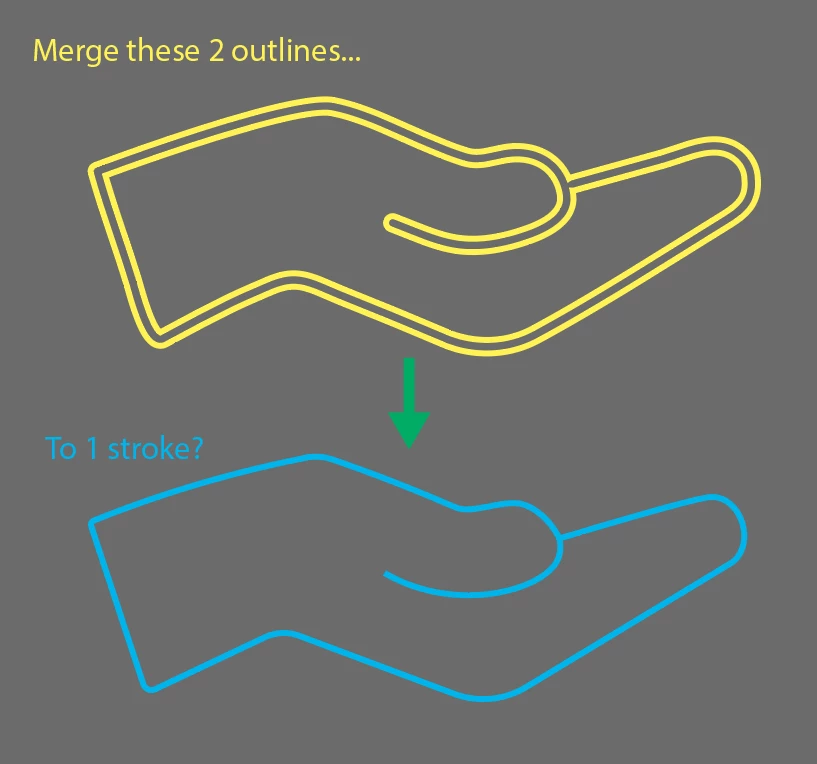


Thanks!

16 replies

Kurt Gold
Community Expert
Community Expert
May 24, 2022

It would certainly be an extraordinary milestone if there were a solution that may work generally, but I doubt that it will be there soon.


Similar requests were posted many times since the Adobe Illustrator forums had been introduced about 25 years ago. Considering all possible scenarios it is just an incredibly and perhaps almost insanely tough task from a technical point of view.


It's rather not surprising that up today there are no real solutions to do the desired conversions with many selected objects in one shot. At least I don't know one that would work in all cases or at least in most cases.


Known Participant
January 29, 2023

LOL! You'd think solving this problem could make someone very wealthy! I'd pay a lot for a tool that did this!

renél80416020
Inspiring
February 6, 2023

Bonjour à tous,

La dernière version d'Illustrator dont je dispose étant la version CS6, je n'ai pas pu ouvrir le fichier de Kurt Gold...

Je ne suis pas certain d'être bien dans le sujet, mais, ces derniers jours, j'ai essayé de faire un script qui traite des tracés autres que les tracés transparents.

( tracés sans croisement) voir l'exemple qui suit.

Format A4 vertical CTRL+A puis exécution du script, résultat à droite 0.72secondes. (version CS6)

Les tracés d'origine d'épaisseurs différentes sont obtenus avec "Décomposer" fond et contour, le script fait l'opération inverse mais en appliquant un style, le même pour toute la sélection (ici pointillé en bleu) , avec possibilité de conserver l'original.

Si intéressé, envoyez moi un exemple à traiter (enregistré pour la version CS6 impérativement)

René

Un autre exemple

Kurt Gold
Community Expert
Community Expert
May 24, 2022

I'm afraid that you actually got me a bit wrong, Scott. I'm sorry in case I may have confused the matter.


Of course, I don't say that you are wasting my time. I was just trying to point out that the action approach may waste *your* time if the source files are not appropriate for the way the action works.


For example, in your sample file the action would rather completely fail, whereas in a file that contains the raw outlined railway lines of the Moscow Metro system it may work pretty well.


That's why I was asking if you may want to use it in other contexts that would actually work.


Participating Frequently
May 24, 2022

You didn't confuse anything at all, Kurt. You've been very helpful.


I understand now that what you've created holds a very specific purpose.


I hope someone creates something similar for what my purposes are, but you've shown me some pretty good alternatives anyway, so thanks for that.

Kurt Gold
Community Expert
Community Expert
May 24, 2022

Scott,


do you need this kind of conversion only for icons that are similar to the icons you shared in your sample file? Or would you sometimes also need it to convert constructions like outlined route maps (subway, train, bus, federal highway etc.), courses of rivers, creeks and runnels or simple schematic drawings? That is, constructions that probably were originally built with open stroked paths?


If that applies I may share the latest action approach. But I would first have to know if you *really* need that in contexts as described above. If so, I would then prepare a handful of sample files that will show that it *may* work pretty well in files that are practical for this approach. Otherwise it would just be a waste of time.


Please don't get me wrong, I'm certainly not going to withhold anything, but as this action approach requires very specific constructions I'd prefer to know if your needs will actually meet them.


Participating Frequently
May 24, 2022

Kurt,


I would probably only use this action for icons/illustrations. I don't think I would personally use it for constructions.


And it's no problem at all. I certainly don't want to waste anyone's time here.

Inspiring
May 23, 2022

I had similar needs when I did pop signage for plotter cutters. I used a combination of 3 strokes, inset and outset, and given spacings set in Pts so I would have a live inside, outside, and core(parent) shape,

Kurt Gold
Community Expert
Community Expert
May 23, 2022

Sometimes I have some weird daydreams that sometimes lead to better actions.


I will share them if it happens again.


BradyLeavell
Inspiring
May 23, 2022

Sorry, my previous comment would just create a shape in between the two, I misunderstood what you were asking. But if you just wanted to fill the shape there you go lol. 

Participating Frequently
May 23, 2022

lol No problem! Thanks anyway!

BradyLeavell
Inspiring
May 23, 2022

I would make a square behind the outlines. Make sure the outlines are a compound path (command or cntrl 😎 and then use minus front in the pathfinder. Use the direct selection mouse (the second one) and just delete the extra! That's the easiest way I can think of

Kurt Gold
Community Expert
Community Expert
May 23, 2022

I understand, Scott.


And of course it‘s remarkable that you are disposed to tackle an experimental approach that initially was supposed to work only in certain situations. It‘s not a general approach.


I have carefully inspected your sample file and saw that even prototype 3 would produce pretty poor and useless results. You may trust me if I say that you will not get the action to work in a satisfying way in conjunction with the icons you provided.


It‘s an extremely tough task with a huge number of potential tripping hazards.


Usually, if there are demanding requests like this one, sooner or later some experienced scripters come around the corner and provide some considerable approaches. Perhaps that will happen again, but I somehow doubt it because I assume that it is beyond the current scripting capabilities as well. Of course, I would be glad if some of the scripting experts may prove me wrong and share something that does not only work in specific contexts, as the action unfortunately does.


Participating Frequently
May 23, 2022

That's a bummer, it would have been an extremely useful tool (not that it isn't already).


Let's hope someone comes up with a quality script in the future!


Thank you for taking time to hash this out with me, you've been very helpful.

Kurt Gold
Community Expert
Community Expert
May 22, 2022

I'm afraid some major modifications would be required (including different or more versatile helper graphic styles and a reorganisation of the entire action concept).


Initially, the action was mainly supposed to convert (former) open stroked paths that had been converted to outlined paths. The latest modified version (prototype 3) can convert complex constructions pretty well, but it requires two additional helper scripts. I haven't shared it so far as it may be more confusing than not because it also requires some specific source files.


As mentioned, currently I have no further plans to improve the approach. You may, of course, take the action as a source for your own experiments.


Participating Frequently
May 23, 2022

I'd be happy to mess around with prototype 3 to see if I can get it to work for what I'm hoping for. I feel like there's a lot of potential here to convert icons back to their original stroked paths.


Whether they know it or not, designers could save a lot of time with an action like this. I know icon creation isn't the most time-consuming activity when you only have to make a few at a time, but when you have 10+ icons to create (let's say for a website) they might spend hours on a task that is arguably less important than others.


If you'd like, I'd be more than happy to share any improvements I make on prototype 3. It would be really cool to get this to work.


Thanks!

Kurt Gold
Community Expert
Community Expert
May 21, 2022

Thanks for the updated download links, Scott.


As far as I can see, I (or possibly you) would have to modify the Stroker action a bit in order to adapt it to your icons. However, it's doable.


If you, on the other hand, would prefer to go the raster to vector conversion route, as suggested by kphotopage, you may keep in mind that nowadays there are a lot of applications and promising open source (online) converters. A couple of them do work pretty well, but in my experience almost all of them will produce rather poor results if you are dealing with more complex constructions.


If you were asking for an excellent application, I would recommend WinTopo. It is able to create incredibly clean conversions. Something I have not seen in any other comparable application so far. Unfortunately, it's only available for Windows.


Participating Frequently
May 22, 2022

Thanks for the info Kurt!


I think I'd prefer to keep my workflow within the Adobe software if possible. But it's good to know that I have options.


What exactly would I need to modify to get the action to work?