Merging diagonal text together
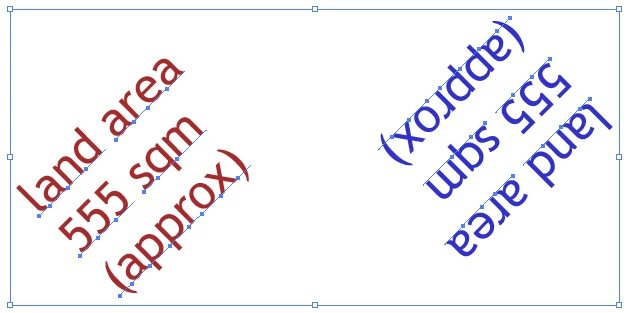
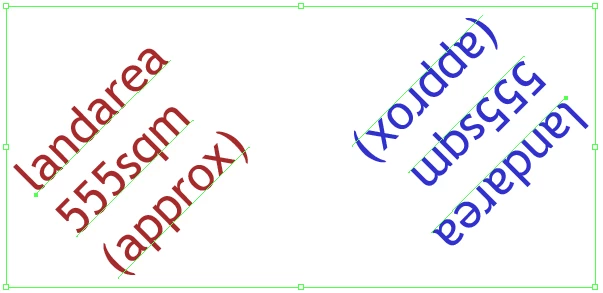
Hi I'm trying to merge these groups of text together but i'm having trouble keeping the spaces after i merge it with my current code.
BEFORE
AFTER
here is my current code
var textLayer = idoc.layers[0]
textLayer.name = "Text";
for (var i = 0; i < textLayer.groupItems.length; i++){
var tempText = ""
var anchor1 = textLayer.groupItems.textFrames[0].anchor
var anchor2 = textLayer.groupItems.textFrames[1].anchor
var TextOnAngle = IsTextOnAngle(anchor1[0],anchor1[1],anchor2[0],anchor2[1])
var TextAngleDeg = TextAngle(anchor1[0],anchor1[1],anchor2[0],anchor2[1])
for (var j = 0; j < textLayer.groupItems.textFrames.length; j++){
if (j == 1){
var newText = textLayer.groupItems.textFrames
.duplicate(textLayer, ElementPlacement.INSIDE)
}
if (tempText == "") {
tempText = textLayer.groupItems.textFrames
.contents; } else {
tempText = tempText + textLayer.groupItems.textFrames
.contents;
if(TextOnAngle){
if(j+1 < textLayer.groupItems.textFrames.length){
var tempAnchor1 = textLayer.groupItems.textFrames
.anchor var tempAnchor2 = textLayer.groupItems.textFrames[j+1].anchor
var CurrentAngle = TextAngle(tempAnchor1[0],tempAnchor1[1],tempAnchor2[0],tempAnchor2[1])
if(!(CurrentAngle <= TextAngleDeg+5 && CurrentAngle >= TextAngleDeg-5)){
//alert(CurrentAngle)
tempText = tempText + '\r'
}
}
}
}
};
//var newText = textLayer.textFrames.add()
newText.contents = tempText
};
textLayer.groupItems.removeAll()
//gets the angle of the text
function TextAngle(x1,y1,x2,y2){
var xDiff = x1 - x2
var yDiff = y1 - y2
return Math.atan2(yDiff, xDiff) * (180 / Math.PI)
}
// works out if text is on an angle or not
function IsTextOnAngle(x1,y1,x2,y2){
if((x1 >= x2-0.1 && x1 <= x2+0.1) || (y1 >= y2-0.1 && y1 <= y2+0.1)){
return false
}else{
return true
}
}
//gets the angle of the text
function TextAngle(x1,y1,x2,y2){
var xDiff = x1 - x2
var yDiff = y1 - y2
return Math.atan2(yDiff, xDiff) * (180 / Math.PI)
}
// works out if text is on an angle or not
function IsTextOnAngle(x1,y1,x2,y2){
if((x1 >= x2-0.1 && x1 <= x2+0.1) || (y1 >= y2-0.1 && y1 <= y2+0.1)){
return false
}else{
return true
}
}
}
if anyone has any ideas on how i can go about working out where to insert the spaces that would be great.
thanks in advance
 AdChoices