Participant
Jul 15, 2022 9:36 PM UTC
Answered

Merging Shapes Not Perfectly Overlapping?

I had 2 rectangular boxes that I created, and I "Top aligned" both of them so that they are on the same height.


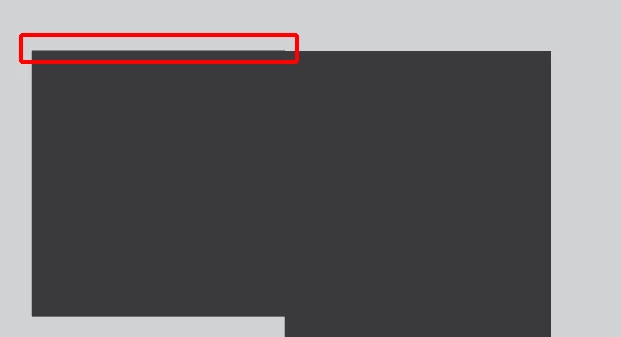
However, when I combine the two shapes using the Pathfinder "Merge" or "Unite" tool, when i zoom in and out at different percentages, i can see that it's not perfectly aligned.


Is this just a glitch? or is there a way to fix this? Please see attached screen shot. At some %'s, it looks fine, but then i'll zoom out, and i can see it.


Any help on this would be greatly appreciated. Thanks everyone!
 

This topic is closed to new replies. Start a new post to keep the conversation going.
Ton Frederiks
Ton FrederiksCorrect answer
Community Expert
Jul 15, 2022 9:46 PM UTC

It could be a GPU preview glitch, try Cmd or Ctr E to switch between CPU and GPU Preview.

Or check the Pathfinder precision settings in the Pathfinder Options and make them very small.

3 replies

Ton Frederiks
Community Expert
Ton FrederiksCommunity ExpertCorrect answer
Community Expert
Jul 15, 2022 9:46 PM UTC

It could be a GPU preview glitch, try Cmd or Ctr E to switch between CPU and GPU Preview.

Or check the Pathfinder precision settings in the Pathfinder Options and make them very small.

Translate
Participant
Jul 15, 2022 9:59 PM UTC

Thank you so much. I changed the precision settings to 0.001 and it fixed everything.


Cheers!

Translate
Ton Frederiks
Community Expert
Community Expert
Jul 15, 2022 10:08 PM UTC

Good to hear that helped.

Translate