


Participant
July 23, 2025
Question

Mesure de surface sur Illustrator 2025

  • July 23, 2025
  • 1 reply
  • 268 views

Bonjour,

Lorsque j'utilise l'outil mesurer, la boîte info n'affiche pas la surface de l'objet.

Les seules infos qui apparaissent sont :
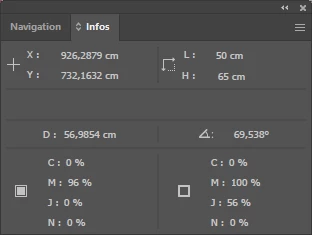
J'ai préalablement sélection mon objet, qui est une surface fermée et remplie.

Je ne comprends pas comment faire apparaître cette information, importante pour mon activité (je suis paysagiste)

Merci de votre aide,

1 reply

Abhishek Rao
Community Manager
Community Manager
July 23, 2025

Hi @claire_3069,


Thanks for bringing this up. I just tested it on my end and I can see the area section showing up in the Info panel as expected.

Could you try drawing a closed and filled shape (like a rectangle or circle), select it, then go to Window > Info to open the panel? While the shape is still selected, click on the Measure Tool and check if the area value appears in the panel.

If it still doesn't show up, I'd recommend resetting your Illustrator preferences, but make sure to back them up first before resetting. You can follow the steps here: Reset Illustrator Preferences.


Let me know how that goes. 

Abhishek

Participant
July 23, 2025

Hello,

I am sorry but it still does not work. Do you have any other idea?
Thank you so much

Claire


Anubhav M
Community Manager
Community Manager
July 24, 2025

Hello @claire_3069,

Thanks for confirming. Could you try running Illustrator under a different administrator account (Windows / macOS) and checking if it helps? If the problem persists, kindly share a small screen recording of your exact workflow and the problem, so I can check it with the team.

Looking forward to hearing from you.

Anubhav