Answered
Meu AI não abre, aparece uma mensagem de erro desconhecido [CANT]
é a versao de 2020 pois as atuais meu mac não tem atualização pra suportar...

é a versao de 2020 pois as atuais meu mac não tem atualização pra suportar...
Hello USART5EDD,
Sorry to hear about this experience. I would request you try resetting Illustrator's preferences manually and check if that helps resolve the issue:
• Close all Adobe applications.
• Go to the following locations
• ~/Library/Caches
• ~/Library/Application Support/Adobe
• ~/Library/Preferences
• Rename Adobe Illustrator, com.adobe.illustrator and Adobe Illustrator 24/23 Settings folders to Adobe Illustrator.old, com.adobe.illustrator.old and Adobe Illustrator 24/23 Settings.old
• Launch Illustrator from the Creative Cloud.
Note: Location starting with this "~" sign indicates the User Library, which is hidden. So, you need to copy & paste the exact path in spotlight search or from Finder Menu > Go > Go to Folder > Paste the location in the dialog box like this: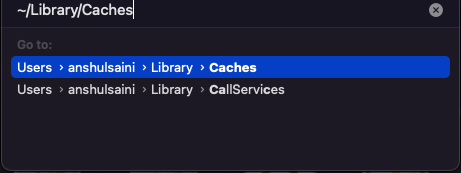
Disclaimer: Please note that renaming preferences folders will remove all the custom settings, and Illustrator will launch with default settings. You can also take a backup of the folders in case you want to. The location is mentioned above.
Looking forward to your response.
Thanks,
Anubhav
Already have an account? Login
Enter your E-mail address. We'll send you an e-mail with instructions to reset your password.
 AdChoices