
sugarcoated293
Known Participant
November 30, 2017
Question

Minus front issue: filter produced no results

  • November 30, 2017
  • 2 replies
  • 9238 views

Hi,

I am currently new to Adobe and am doing the following tutorial:

Logo Design Tutorial For Beginners | Adobe Illustrator | Text Logo | D - YouTube

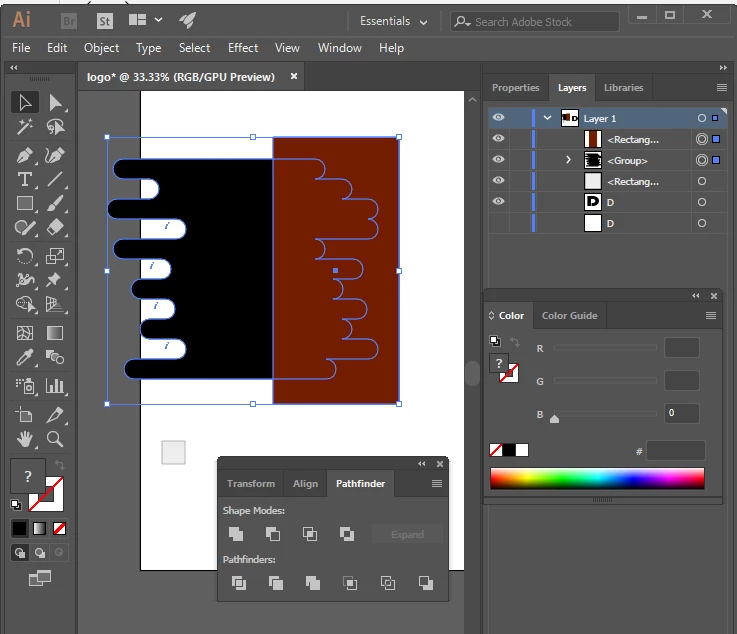
At 2:34, I am supposed to use the minus front tool but when I tried to do it on mine, it said the filter produced no results-please select two intersecting paths. If it helps, I have attached a picture of what I have done when I tried to use the minus front tool. I want to mention that the first time I tried it it worked and then for some reason I had to undo some stuff using ctrl+z till a bit before this step- I am not sure whether this is significant in impeding what I had to do afterwards.

Any help is appreciated! Thanks
This topic has been closed for replies.

2 replies

Simmer1
Community Expert
Community Expert
December 2, 2017

Hi,

Like Monika said I think Ungrouping the black shape will allow you to then use the Minus Front function.

Select the shape with the selection Tool

Next next go Object> Ungroup.

Then hopefully the minus front function will work.

Monika Gause
Community Expert
Community Expert
November 30, 2017

The black one is a group. What's inside that group?

sugarcoated293
Known Participant
December 2, 2017

What do you mean whats inside the group?

There were some circles that needed to be removed from inside the group in the previous step

Anna Lander
Inspiring
December 2, 2017

check pls your Layer pane. It indicates that your black shape is a group. I think you made 1-2 extra steps by CtrlZ and undoned the removind of these circles. So repeat this step, make sure that your black shape is a path, and then Minus Front will work correctly.