Participant
December 18, 2017
Answered

Minus Front... Program Bug or Am I Doing It Wrong???

  • December 18, 2017
  • 3 replies
  • 486 views

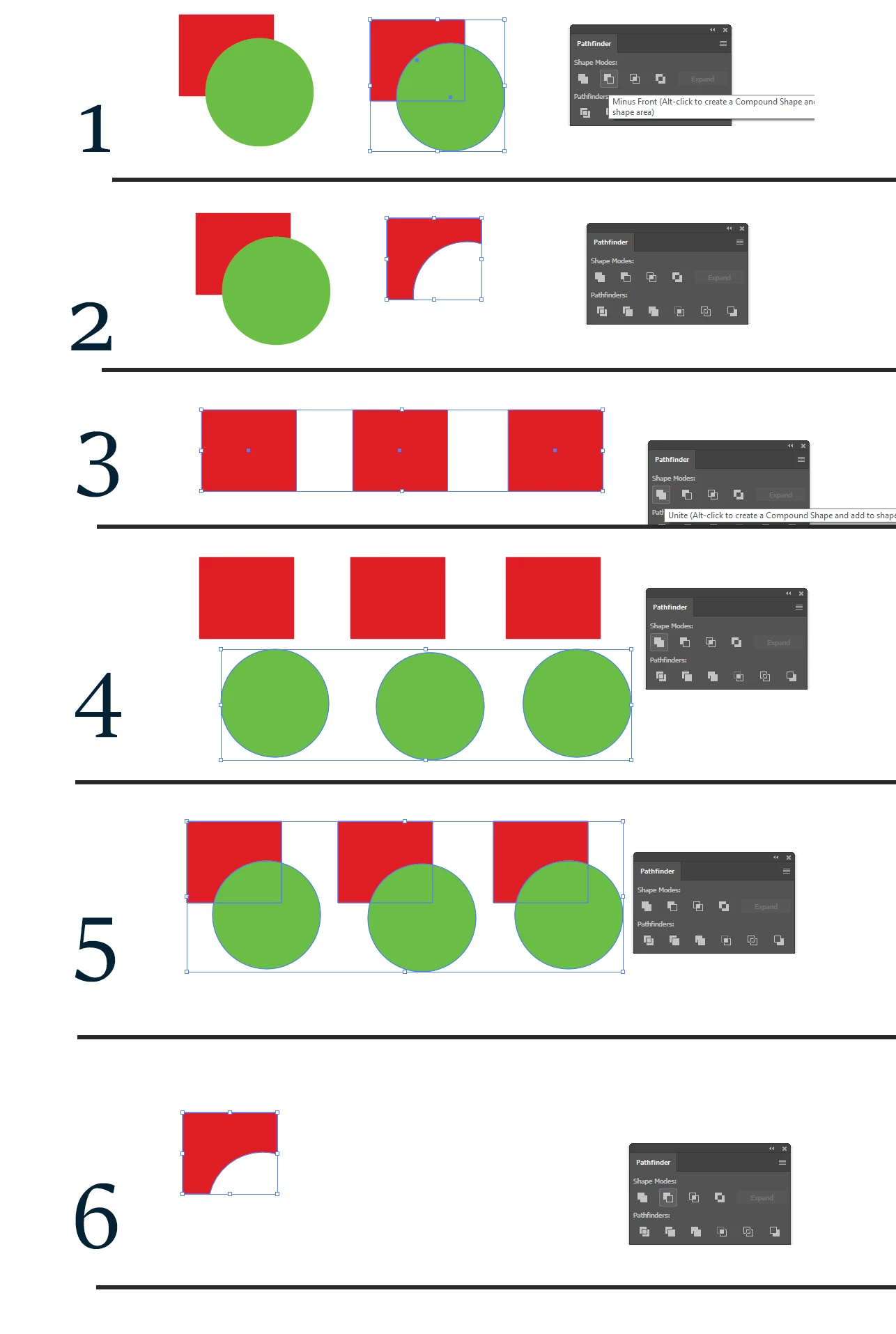
I just recently purchased and downloaded Illustrator and started work on my first file. In the process, I was trying to knock out a shape from another shape (paths I guess you experts call them). Anyway, It seems to work fine with a single image, but if I combine two or more objects (using the UNITE feature) and then try to MINUS from front, it deletes everything except for a small portion... usually in the upper left section. Attached is a file of various screen shots I took that hopefully explains it better. You will see in my example image that steps 1 and 2 work fine....But when I combine objects (the red squares, and then the green circles) and then try to knock out the green circles from the red squares, it deletes the last two squares. Please let me know if I am doing this wrong, or if my program has an issue.
    This topic has been closed for replies.
    Correct answer Kris Hunt

    > if I combine two or more objects (using the UNITE feature)

    Right after doing that, you must convert to a Compound Path if you want to do any more boolean operations. Otherwise, it performs the operation on only one item in the group (the bottommost, I believe).

    3 replies

    Ray Yorkshire
    Participating Frequently
    December 18, 2017

    Another way, but using Compound Shapes:

    In step 3 Alt (Option on a mac) click Unite

    Then in step 5  selecting all , Alt click Minus Front.

    You get the same looking result, but it is non destructive, like an effect, eg you can make alterations like  move the parts about with the Direct selection Tool.

    Participant
    December 18, 2017

    Ahh, that worked!!!! Thank you!!!

    Kris Hunt
    Kris HuntCorrect answer
    Legend
    December 18, 2017

    > if I combine two or more objects (using the UNITE feature)

    Right after doing that, you must convert to a Compound Path if you want to do any more boolean operations. Otherwise, it performs the operation on only one item in the group (the bottommost, I believe).