
suzyl48646406
Participant
January 25, 2018
Answered

Missing Extension

  • January 25, 2018
  • 2 replies
  • 2584 views

I have recently purchased adobe Illustrator creative cloud suite (CC 2018).

I bought a “Roland Cutter GS24)“ and am able to utilise it through a plug-in called CutStudio for Illustrator.

I have downloaded the plug in, I have checked that it is sitting in the “my apps“ section on my creative cloud app however it doesn’t appear in the stream of actions.

when I open adobe illustartor the only option I have under window is find extensions through exchange and then it just goes to the place where I downloaded the plugin.

i have gone through the whole troubleshooting page and no luck...can anyone shed any light? I am completely new to all this and it’s doing my head in already!!! Help please!!!
    This topic has been closed for replies.
    Correct answer Ray Yorkshire

    Rolland always seem to be years behind

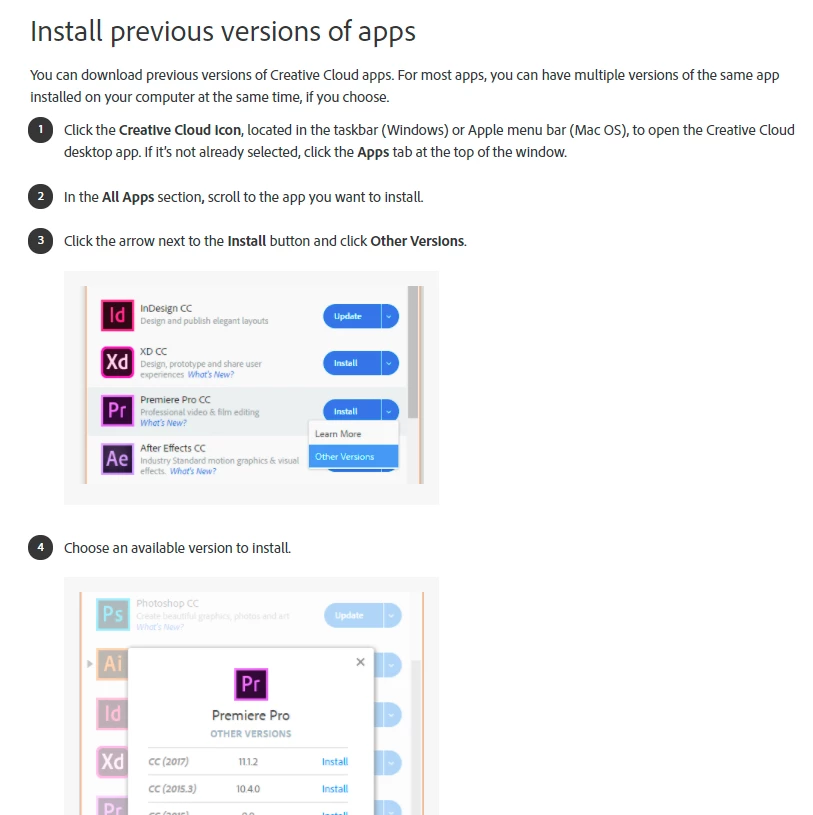
    Maybe try installing an older version of Illustrator, not sure how far back,  and running  the plugin on that.

    Download and install Creative Cloud apps

    2 replies

    Ray Yorkshire
    Ray YorkshireCorrect answer
    Participating Frequently
    January 25, 2018

    Rolland always seem to be years behind

    Maybe try installing an older version of Illustrator, not sure how far back,  and running  the plugin on that.

    Download and install Creative Cloud apps

    suzyl48646406
    Participant
    January 25, 2018

    Thanks Ray! I downloaded the 2017 version of Adobe Illustrator CC and now the plugin appears.

    Next issue - I can't find a driver for my mac so I can't connect the machine!!!!

    Participant
    February 6, 2021

    I am having the same issue. How can you download an older version of CC2017?

    Monika Gause
    Community Expert
    Community Expert
    January 25, 2018

    Roland Cut Studio doesn't support CC2018

    Can be read here: Installing the Adobe Illustrator Plug-In