
Participant
November 20, 2018
Question

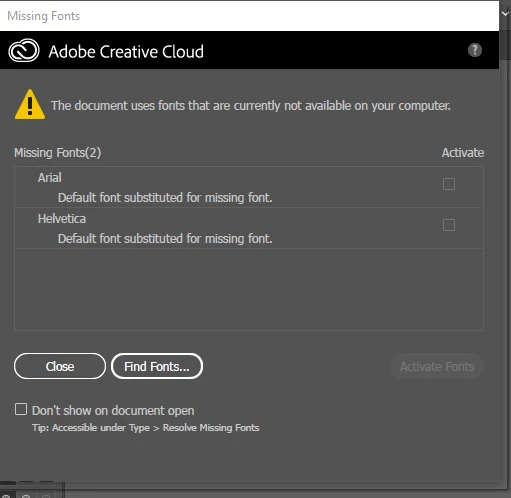
Missing fonts Ariel and Helvetica reported on PDF load, but they are present

  • November 20, 2018
  • 2 replies
  • 1556 views

Adobe Illustrator CC 23.0.1 (64-bit)

When I load a PDF drawing generated by a CAD program, I am consistently given this error message, and all of my imported text is highlighted in pink, presumably to show the font mismatch. Of course these fonts are actually present in Windows 10.  I try to Find Fonts, but even when I point to them, they won't load; maybe I am doing that wrong. The substitute font is a different width, and is misaligned with virtually all of the graphics, making many features unreadable. If I select each bit of text individually and reassign Arial font, they look fine again.  But the Find Font mechanism is supposed to take care of that, right?

I have read similar questions, but it looks like they don't have answers, or those answers don't seem to work. 

  • Windows 10 64 bit
  • Two different machines yield identical results
This topic has been closed for replies.

2 replies

Srishti Bali
Legend
November 23, 2018

Hi Tim,

Illustrator will only show fonts which are either installed on the system or activated through Adobe Fonts: Search fonts | Adobe Fonts

Please check if these fonts are available on your system or not?

For MAC: Mac OS X: Font locations and their purposes - Apple Support

For Windows: Check this location: Control Panel\Appearance and Personalization\Fonts

Regards,

Srishti

Monika Gause
Community Expert
Community Expert
November 20, 2018

Illustrator is not a general purpose PDF editor.

Prepression: The Ten Commandments of PDF

When embedding fonts into a PDF, strnge things happen which might include renaming the font. Also when a document goes from Windows to Mac or vice versa, fonts might not work as well. And then we don't know what the CAD program did with formatting.

Bite the bullet and reassign it.