
Participant
March 12, 2022
Question

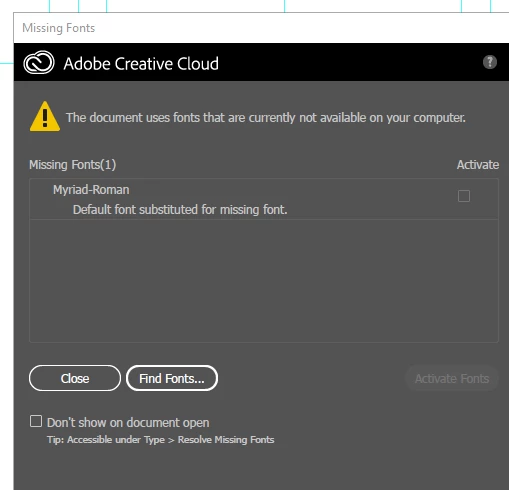
Missing Fonts Pop-Up - Myriad-Roman

  • March 12, 2022
  • 1 reply
  • 2988 views

For my job I open hundred of AI files every day. Most of them have this old Myriad-Roman font that is no longer used/supported by Adobe. It has since been updated to a different name. I did some research on it a few months ago, and now I'm back because it's really bothering me again.


I've tried installing Myriad-Roman on my PC, and having people send me various fonts with an identical name, but I continue to get this pop-up. Is there a way I can get this to go away?
 

This topic has been closed for replies.

1 reply

Brad @ Roaring Mouse
Community Expert
Community Expert
March 13, 2022

The old Myriad font that yours is indicating is the Postscript name for the Type 1 version that Adobe licensed before they started replacing them with OpenType versions, literally over 20 years ago. The new name is Myriad Pro and has many benefits over the old version. You SHOULD switch to that. and pretty much everyone should have it and if for some bizarre reason you don't, it's available through Adobe fonts.

You will be required to manually search and change from one to the other in the documents; it won't be automatic, and there's the potential for some reflow as the fonts were tweaked when upgraded to Opentype..

There's no point trying to use the old version, and if you're trying to install so-called versions of it from your friends or from all over the interent, if they aren't Adobe Type 1 versions, they are knockoff clones and aren't worth your while going forward. besides, Type 1 is essentially dead, so you will have to replace them next year anyway.