
Participating Frequently
May 28, 2022
Answered

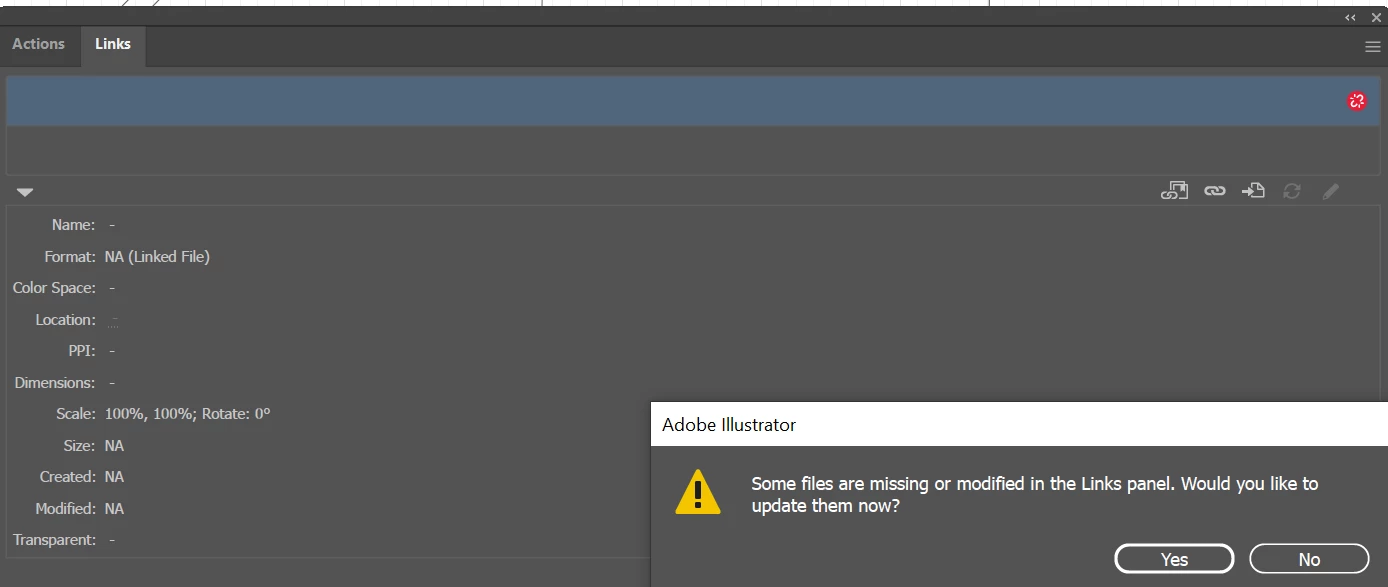
Missing links are interrupting workflow

  • May 28, 2022
  • 1 reply
  • 320 views

Hi,
I am using Illustrator 2022 on PC.

I have not changed any links, so I am having a hard time understanding how some links could have gone missing to begin with. Secondly, When I click Windows --> Links, I can't see ANY links in the list. Still there is some kind of information underneath where the list should be (where I selected in blue). I have no idea what is going on, and the pop-up of missing links comes up every 20 seconds. How can I change this?


This topic has been closed for replies.
Correct answer Ton Frederiks

Strange behaviour. Try copy the content, paste into a new document (paste remembers layers checked in the layers panel). Save the new doc and see if it goes away.

Restarting your computer and resetting preferences is another thing to try.

https://helpx.adobe.com/illustrator/using/setting-preferences.html

1 reply

Ton Frederiks
Community Expert
Ton FrederiksCommunity ExpertCorrect answer
Community Expert
May 28, 2022

Strange behaviour. Try copy the content, paste into a new document (paste remembers layers checked in the layers panel). Save the new doc and see if it goes away.

Restarting your computer and resetting preferences is another thing to try.

https://helpx.adobe.com/illustrator/using/setting-preferences.html

Participating Frequently
May 28, 2022

Thanks, this seems to work very well. No problems and can see the list in Links now.

Ton Frederiks
Community Expert
Community Expert
May 28, 2022

Good to hear that worked for you.