jellyfunk
Known Participant
November 28, 2020
Question

Missing Links Illustrator CC

  • November 28, 2020
  • 2 replies
  • 417 views

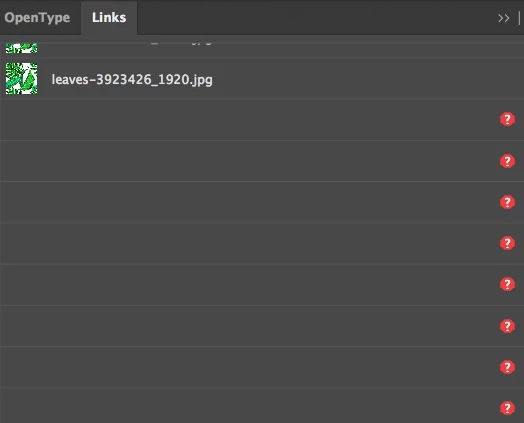
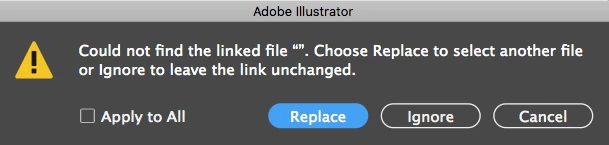
Hi, I've been having this occur for months where on occasion i'll open an AI file and i'll get a warning upon opening that says it can't find the linked file but it's always the same message and there are no file names for the images....just "" as the image name. There are also no file names in the Links tab so I've had to throw out files and restart which is obviously time consuming if I can't figure out which files are missing. Not ideal. Does anyone know a workaround on this? I'm running V24.3 on High Sierra OS. I can't update as I have a 2011 iMac so if it's an OS issue then i'll just have to avoid using images in AI going forward.

Thanks community.

Hope you're all safe and well.

adam
 

This topic has been closed for replies.

2 replies

tkienekeracs
Participant
December 8, 2020

I am having this same issue. Like Adam, this is happening with multiple files, for about a year now, and my linked files are also on dropbox or onedrive, but stored locally. I'm on Windows 10 and I haven't done anything major in the last while. It happens over and over again, even within the same day after I've relinked everything again and then re-open the file later in the day. 

Srishti Bali
Community Manager
Community Manager
December 6, 2020

Hi there,


We're so sorry to hear about this trouble. I understand that it's frustrating. I would request if you could share a few more details like:


  • Is the issue related to a specific document? If yes, could you please share the document with us? You can upload it to the Creative Cloud (https://helpx.adobe.com/in/creative-cloud/help/share.html) and share the download link. 
  • Where are the linked files saved (Network Drive/ System HDD/ Shared Folder on System /External HDD)? 
  • When did this start happening? Are there any recent changes made to your system? For example, any antivirus, system updates or web extensions installed recently. 


You may try the steps suggested on this page ( https://community.adobe.com/t5/illustrator/resolve-slow-performance-and-unexpected-behaviors-in-illu... ) and share your observations with us.


We’re here to help, just need more info.    


Regards,

Srishti

jellyfunk
jellyfunkAuthor
Known Participant
December 7, 2020

Hi Srishti,

Thank you for taking the time to reply to this. To answer your questions:

  • it's not related to a specific document or link/image. it's happened to quite a number of different unrelated files with the same "" file name. here's one of the documents https://shared-assets.adobe.com/link/4c932f25-5b50-42ad-6f56-305b84168d3c
  • the links are in multiple folder mostly all on Dropbox but stored locally.
  • i'd say it started happening a year ago. i didn't do any major system changes that i can remember.

Please let me know if there's anything else i can share.

Thanks again.

Best,

Adam