designm19985728
Participating Frequently
November 26, 2018
Answered

missing rectangle tool

  • November 26, 2018
  • 3 replies
  • 17492 views

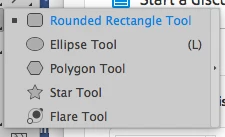
Turned on illustrator this morning, tried to draw a box, but the rectangle tool has disappeared?!?

Restarting program made no difference.

Help!
    This topic has been closed for replies.
    Correct answer Doug A Roberts

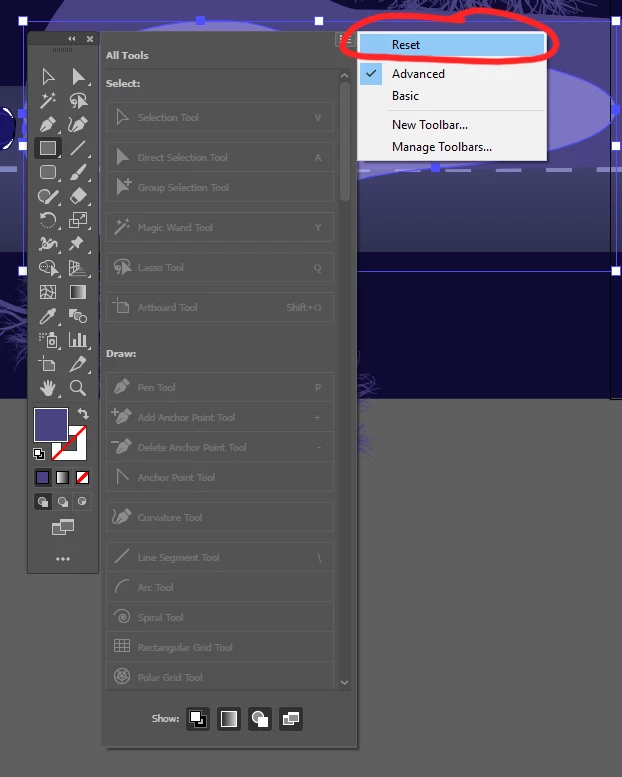
    The tools have been nomadic since the CC2019 update. Click the three dots at the bottom and reset it here:
    3 replies

    pixelwash
    Participating Frequently
    August 4, 2020

    The annoyance and mystery to me is why the toolbox keeps reconfiguring itself so that the rectangle tool disappears, likewise the pencil tool is inclined to disappear or be demoted to a sub menu. Why should I have to keep "resetting" it?

    Larry G. Schneider
    Community Expert
    Community Expert
    August 4, 2020

    Two things. Learn the KBSC keys for the important tools and make sure you have released the click before dragging the cursor back to the work area. The tool box is now configurable by a click and drag.

    pixelwash
    Participating Frequently
    August 5, 2020

    More proof Adobe has "lost the plot" when it come to basic app UI design and use, lol. Memorize ALL the key commands? I'm largely a 3d rendering and Unity guy, although I actually met Warnock when he was demonstrating illustrator version 1, and have used it since then. Do you have any idea how many apps I use in the course of my work? F them. Everybody thinks they are the center of the universe.

    KShinabery212
    Community Expert
    Community Expert
    November 26, 2018

    Curious will the reset fix everything.  As the strange thing with the tools is something bugging me.

    Let's connect on LinkedIn. https://www.linkedin.com/in/kshinabery/
    Doug A Roberts
    Community Expert
    Community Expert
    November 26, 2018

    KShinabery212  wrote

    Curious will the reset fix everything.  As the strange thing with the tools is something bugging me.

    What do you mean? It sets the toolbar back to its saved state.

    designm19985728
    Participating Frequently
    November 26, 2018

    um found it, but seriously WTF?

    Has this been moved there on purpose or is this wrong?

    Doug A Roberts
    Community Expert
    Doug A RobertsCommunity ExpertCorrect answer
    Community Expert
    November 26, 2018

    The tools have been nomadic since the CC2019 update. Click the three dots at the bottom and reset it here:
