Known Participant
February 19, 2022
Answered

Missing simple element(layer)-activation in the layer palette.

  • February 19, 2022
  • 1 reply
  • 144 views

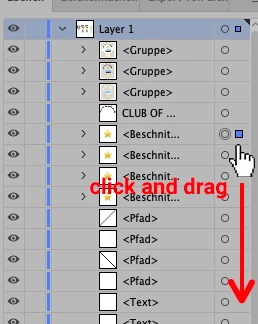
Years ago, there was the possibility to simply activate multiple layers by just holding down the alt-key and click and drag up/down the layer palette layers.

Today you have to click every single layer separately to activate it or click and hold shift to activate more than one.

Please Adobe bring back the old function:


Thanks

Jan

This topic has been closed for replies.
Correct answer Monika Gause

Click the target symbol (the circle) of the first object and then shift-click the target symbol of the last object in a row to select them all.

1 reply

Monika Gause
Community Expert
Monika GauseCommunity ExpertCorrect answer
Community Expert
February 19, 2022

Click the target symbol (the circle) of the first object and then shift-click the target symbol of the last object in a row to select them all.