Answered
Move a pattern without a tilde button?
Hi! I have a macbook pro from 2017 with a swedish keyboard. It has no tilde button.
How do I move a pattern within a shape without that button on my keyboard?

Hi! I have a macbook pro from 2017 with a swedish keyboard. It has no tilde button.
How do I move a pattern within a shape without that button on my keyboard?
If Jacob's Smörgåsbord of advice doesn't solve it, you could go old Skool and:
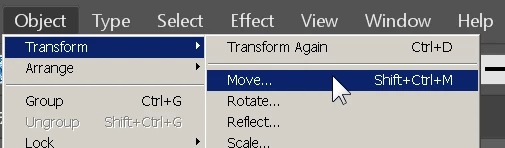

Deselect Transform Objects and highlight a field and use the arrow keys, mouse scroll, or just input a distance
Already have an account? Login
Enter your E-mail address. We'll send you an e-mail with instructions to reset your password.
 AdChoices