

subieguy2
Inspiring
October 16, 2014
Question

Move corresponding text and overlapping graphics

  • October 16, 2014
  • 1 reply
  • 566 views

OK so I have a JavaScript in CS4 that I wrote that will take selected text objects and create a layer formatted the way I need it.

For example the following text items are selected:

13   16   23   FF

The script will create the following layers:

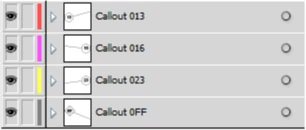
Callout 013

Callout 016

Callout 023

Callout 0FF

There is always a circle and a line behind each text item. They look like this....(I have included screen shots of the objects properties)
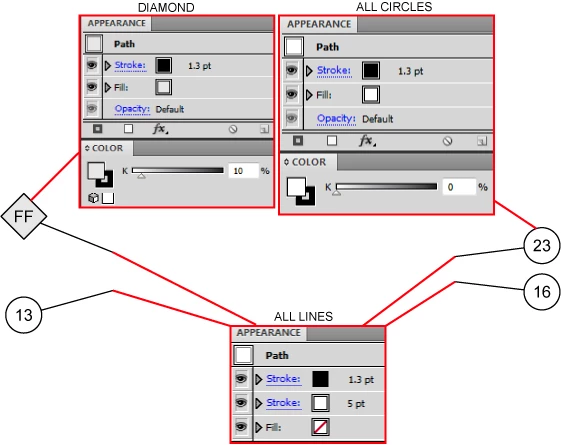

I am wanting my script to recognize the location of the items that overlap the corresponding text and after it creates the layer just send it all to the correct layer. So text object 13 would create the layer and the circle and line that are with it would go to the layer Callout 013. These items are not grouped. I am moving them manually right now but the volume I do I thought I would ask. This could be way too advanced and if it is I will continue doing it manually.

Here is what the final layers would look like after the script ran...
Anyone willing to advise or help me figure this out? Greatly appreciate it!


This topic has been closed for replies.

1 reply

Participating Frequently
October 17, 2014

It's hard to tell what you are trying to accomplish with this beyond simply grouping nearby elements.  A bit more context of the series of events along the way would be helpful as it might be easier to approach this from a different angle.

subieguy2
subieguy2Author
Inspiring
October 20, 2014

Essentially that is all I am trying to do. If the items that are nearby could be grouped and then sent to the corresponding layer.

Here is a layout of the steps I take.

1. I select the text objects

2. I run my script to create layers based on the selected text objects content and format the layer name to a certain requirement. Callout and 3 digits.

3. I select the circle line and text that are close and send to the correct layer.

So for an example using my picture above.....

1. I select number 13

2. I run my script to create my custom layer based on my selection and get a layer name Callout 013

3. I select the number 13 and the line and circle that are right there with it

4. I send those 3 items (#13, circle, line) to the layer Callout 013

Does that help?

Qwertyfly___
Legend
October 22, 2014

You may be able to modify this script to work with your current script.

This is not my script, All credit goes to John Wundes.

http://www.wundes.com/JS4AI/groupOverlappingObjects.js